

It's 11:40 on a Tuesday night. Your work van should be parked at the shop, your teen said they'd be home by ten, and your Turo guest's trip ended at six. Do you actually know where any of them are right now?
For most owners, the honest answer is "I'll find out later," usually from a fuel receipt, an odometer reading, or an awkward phone call. A GPS tracker for fleet management turns that into "I know right now." It tells you the moment your car, truck, or van moves outside the hours and places you've approved, shows the route it took, and keeps a timeline you can check the next morning.
That works the same whether you run five service vans or own one car that really matters to you. This guide covers what unauthorized after-hours vehicle use really costs, the tracker features that expose it, a 15-minute setup, a policy you can copy, and the legal lines worth respecting.
Yes, a GPS tracker exposes unauthorized after-hours vehicle use, as long as you set it up to tell you. Plug a tracker into each car or truck, draw a geofence around where it parks overnight, turn on movement alerts for your off-hours, and check the trip timeline each morning. Tell everyone who drives it that it's tracked. That combination catches a van on a side job, a car out past curfew, or a rental kept past its trip end while it's happening, not at the end of the month.
What is unauthorized after-hours vehicle use?
Unauthorized after-hours vehicle use is any trip in a car, truck, or van you own that happens outside the hours or places you've approved, without your permission. In a business, it's personal errands, weekend trips, or side jobs in a company truck. In a family, it's the car leaving the driveway after curfew. For a Turo host, it's a guest driving after the trip should have ended.
Some people in the industry call these "ghost miles": miles that never show up on a schedule but always show up in fuel, wear, and risk. The trouble is that nobody announces them. They build quietly until a fuel bill, an early oil change, or a phone call from the police forces the question.
The company van
A tech takes the work truck home "for an early start," then uses it for a Saturday side job. Your fuel card and your insurance carry the cost.
The family car
Your new driver has a 10 p.m. curfew. The car pulls out at 11:15 for a "quick drive" with friends, during the hours teen crash risk peaks.
The Turo rental
A guest's trip ended Sunday at 6 p.m., but your car is still 90 miles away at midnight, racking up miles you didn't price in.
What after-hours use really costs you
Most owners think about fuel first. Fuel is real, but it's the smallest part of the bill. The bigger costs are wear you didn't plan for, liability you didn't agree to, and the safety risk that comes with late-night driving.
Ghost miles add wear and depreciation
Every unapproved mile pulls your next oil change, tire rotation, and brake job closer. It also lowers resale value, since buyers and lessors price cars by the odometer. On a small fleet, a few personal miles a night per van adds up to a lot of extra service visits over a year.
How much do ghost miles cost? A quick way to estimate
The IRS business standard mileage rate is built from an annual study of what it costs to run a car, including fuel, maintenance, insurance, and depreciation, so it's a fair yardstick. The IRS set it at 72.5 cents per mile for 2026, then raised it to 76 cents per mile starting July 1, 2026.
Formula: unapproved miles per week × 50 weeks × $0.76 = yearly cost per vehicle.
Example: 12 personal miles a night, 5 nights a week, is 3,000 miles a year. That's about $2,280 per van, or roughly $9,120 across four vans, before you count any liability. Your real number will differ, so plug in your own miles once your tracker shows you what's actually happening.
Liability when something goes wrong
If an employee crashes a company truck at 10 p.m. on a personal errand, a lot depends on whether the trip was within the "scope of employment" and on the exact wording of your commercial auto policy. Those questions are often argued after the fact, with each side trying to reconstruct where the truck was and why.
A tracker doesn't decide those questions, but it gives you a time-stamped record of when the trip started, where it went, and when it ended. That record is far stronger than a driver's memory or a handwritten log. It's worth asking your insurance agent how your policy treats personal use of company vehicles before you ever need to know. (This is general information, not legal advice.)
Late-night driving is riskier driving
For families, after-hours use is mostly a safety question. Children's Hospital of Philadelphia's Teen Driver Source reports that teen motor vehicle crash deaths in 2022 occurred most often between 9 p.m. and midnight, about 20% of the total. A CDC analysis of 16 and 17 year old drivers found that 31% of those in fatal crashes crashed at night, and most of those night crashes happened before midnight.
That's why many parents set a curfew earlier than their state's licensing law requires. A tracker simply tells you whether the curfew is holding, without a nightly interrogation.
Theft keeps the same hours
Overnight is also when a parked car is most exposed. The same alert that flags an unapproved trip will flag a car that's being driven off by someone who shouldn't have it, which is why movement alerts on a parked car matter for every owner, not just businesses.
How a GPS tracker for fleet management exposes after-hours use
Every serious tracker shows a dot on a map. What actually exposes after-hours use is the combination of four things: a live location that keeps up, boundaries that alert you, a parked-car alarm, and a trip record that's hard to argue with.
1. A live map that keeps up
When an alert comes in at 11 p.m., you want to see where your car is now, not where it was three minutes ago. ShadowGPS trackers update every 5 seconds while your car is moving, so the map moves with it street by street. Many budget trackers refresh once a minute or slower, which is fine for a weekly report but frustrating when something is happening right now.
2. Geofence alerts around where it sleeps
A geofence is a virtual boundary you draw on the map: your shop yard, your driveway, your Turo parking spot, or your service area. When your car leaves that boundary, you get a notification on your phone.
The trick is to draw it tight around where the car parks overnight. A geofence around your whole county is useless at 2 a.m. A geofence around your lot tells you within moments that a truck just left. We walk through the details in our guide to setting up geofence alerts that catch overnight movement.
3. Car Alarm while it's parked
Geofences are great for a known parking spot. For a car parked somewhere new, Car Alarm in the ShadowGPS app is the simpler move: turn it on when you park for the night, and the app alerts you if your car starts moving. It's the most direct answer to "is my car still where I left it?"
4. Trip timeline and trip replay
The trip timeline logs when each trip started and ended, the route it took, and where it stopped. Trip replay lets you play a trip back on the map. This is the record you sit down with the next morning: not "I think the van went out," but "the van left the yard at 7:42 p.m., stopped at this address for two hours, and came back at 10:15."
Bonus: tamper alerts
The first thing a driver tries when they don't want to be seen is unplugging the tracker. Tamper alerts tell you when that happens, and a gap in the trip timeline is its own red flag. Treat unplugging as a policy issue in itself, not as a technical glitch.

Which ShadowGPS tracker fits your situation?
ShadowGPS makes two trackers. Both use the same app and the same alerts. The difference is how they're powered and where they go.
ShadowAuto: plug it into your car or truck and forget it
For cars, pickups, vans, and Turo rentals, ShadowAuto is the default pick. It plugs into the OBD-II port under your dashboard in under 2 minutes, with no tools and nobody to hire. It draws power from your car, so there's nothing to charge, and it also reads engine codes so you can see a check engine light from your phone. Not sure where the port is? Here's how to find your OBD2 port in 30 seconds.
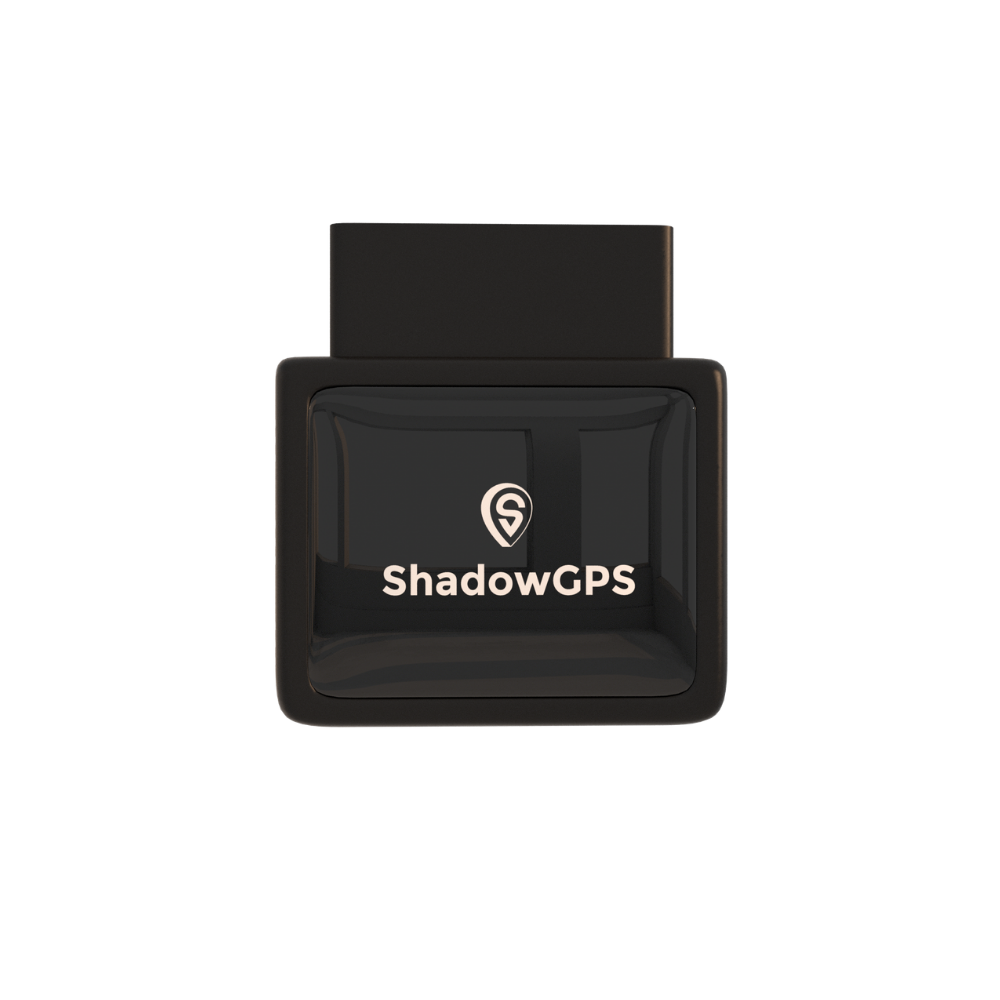
ShadowAuto
Plug-in · OBD-II · For cars, trucks & vans
Plans from $9 to $15/mo depending on billing term · No contract, ever.
- Plugs into the OBD-II port in under 2 minutes, no tools
- Geofence alerts, Car Alarm, and tamper alerts
- Trip timeline, trip replay, and engine codes


ShadowTrack: for trailers, equipment, and anything without a port
Trailers, generators, mowers, older vehicles, and equipment don't have an OBD-II port. ShadowTrack runs on a rechargeable battery that lasts up to about 15 days per charge and comes with a weatherproof magnetic case, so you can mount it out of the way on a trailer frame or inside a toolbox. It's also handy when you want to move one tracker between vehicles.
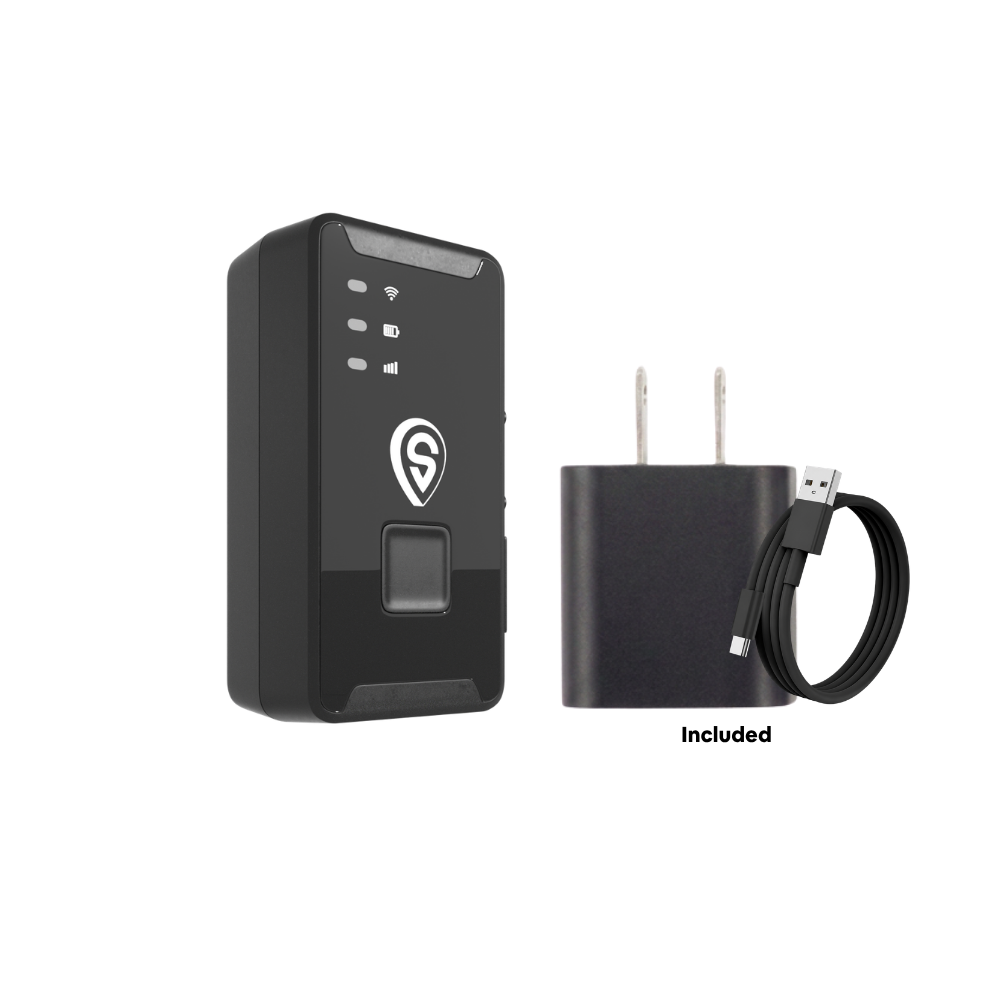
ShadowTrack
Battery · Portable · For trailers, equipment & non-OBD vehicles
Plans from $9 to $15/mo depending on billing term · No contract, ever.
- Rechargeable, up to about 15 days per charge
- Weatherproof magnetic case, mounts in under 2 minutes
- Same app and alerts as ShadowAuto
Best for: ShadowAuto for any car, truck, or van you drive or rent out. ShadowTrack for trailers, equipment, and vehicles without an OBD-II port. Many small fleets use both.
How to set up after-hours alerts in 15 minutes
Step-by-step: catch unauthorized after-hours use
- Plug in or mount the tracker. ShadowAuto goes in the OBD-II port. ShadowTrack goes in its magnetic case. Each takes under 2 minutes.
- Name each tracker clearly. Use the car and the driver, like "Van 2, Marcus" or "Civic, Ava." It makes 11 p.m. alerts instantly readable.
- Draw a tight geofence around where it parks overnight. Your yard, your driveway, or your Turo spot. Small is better.
- Turn on alerts for your off-hours. Geofence exit alerts for known parking spots, Car Alarm for anywhere else.
- Decide who responds and how. One person owns the alert: you, a co-host, an office manager, or a co-parent.
- Review the trip timeline every morning for two weeks. You'll learn what "normal" looks like and spot patterns fast.
- Tell every driver, in writing. Tracking works best as a deterrent when people know about it.
Tip for take-home vehicles
If your techs take trucks home, the overnight geofence goes around each driver's home address instead of the shop. Then the question becomes simple: did the truck leave home after hours, and was it a call-out?
Tip for avoiding alert fatigue
If you get ten alerts a night, you'll stop reading them by week two. Start with one geofence per vehicle and one alert type. Add more only once you know what normal looks like.
GPS tracker vs. other ways to catch after-hours use
You can try to catch after-hours use without a tracker. Here's how the common methods compare on the questions that actually matter.
| Method | Alerts you while it happens? | Shows route and times? | Needs the driver's honesty? | Best for |
|---|---|---|---|---|
| Mileage logs and odometer checks | No | No | Yes | Tax records |
| Fuel card reports | No | Partly (purchase location only) | No | Spotting unusual fuel spend |
| Bluetooth tag (AirTag, Tile) | No | No trip history, relies on nearby phones | No | Keys and bags |
| Dash cam | No, only after review | Video only | No | Crash evidence |
| ShadowTrack (battery GPS tracker) | Yes | Yes | No | Trailers, equipment, non-OBD vehicles |
| ShadowAuto (OBD-II GPS tracker) | Yes | Yes | No | Cars, trucks, vans, Turo rentals |
Bluetooth tags find items through nearby phones, so they can't send a reliable live route or trip history. Turo also prohibits AirTags as an active tracking device on listed cars.
Real-world examples: what the data shows and what to do
Here's how after-hours use typically shows up in a trip timeline, and the calm way to handle each one. The first is a published fleet case; the other two are common patterns, not specific customer stories.
A service fleet sets a "curfew"
McCall Service, a service company profiled by Automotive Fleet, flags any company vehicle running after 7 p.m. for review, since that's when work use normally stops. The company reported that unauthorized use dropped considerably, to the point that drivers half-jokingly asked whether they'd now need to buy their own cars. The lesson: a clear cutoff time plus consistent review does most of the work.
The teen's "quick drive"
What you see: the family car leaves the driveway geofence at 11:15 p.m., two stops, home at 12:40 a.m.
What to do: don't open with an accusation. Open the trip replay together the next day, talk about why the curfew exists, and agree on what happens next time. For more on this, see our guide on what every parent should know before handing over the keys.
The guest who kept driving
What you see: your Turo trip ended at 6 p.m., but the car is still moving 90 miles away at 9:30 p.m.
What to do: message the guest through Turo first, save the trip timeline as documentation, and follow Turo's late-return process. Our Turo host tracker guide covers this in detail.
Write a simple after-hours vehicle use policy
A tracker exposes the problem. A written policy is what actually stops it, because it turns "I didn't know" into "I signed this." For a small fleet, four lines are enough.
- Approved hours. When company vehicles may be driven, and when they must be parked.
- Exceptions. On-call work, take-home trucks, commuting, and who approves anything else.
- Disclosure. That every company vehicle has a GPS tracker, what it records, and who sees the data.
- Consequences. What happens after a first and a repeat violation, including unplugging the tracker.
Sample policy wording you can adapt
"Company vehicles are for work use between 6:00 a.m. and 7:00 p.m., Monday through Friday, plus approved on-call trips. Take-home vehicles may be used for commuting only. All company vehicles carry a GPS tracker that records location, trip times, and routes. Trip data is reviewed by [name] and used for safety, theft recovery, and policy enforcement. Personal use outside these rules, or unplugging a tracker, may lead to loss of vehicle privileges or other discipline."
Rolling it out well matters as much as the wording. Our guide on telling your crew about GPS trackers without losing their trust covers the conversation itself.
Is it legal to track after-hours vehicle use?
The short version: track what you own, and tell people
In the U.S., tracking a car, truck, or van that you own is generally legal. The risk comes from tracking a vehicle you don't own, or tracking people without the notice your state requires. A few specifics worth knowing:
- Company vehicles: several states require employers to give notice of electronic monitoring, including New York under Civil Rights Law §52-c, Connecticut, and Delaware, and New Jersey has a specific notice law for tracking employee-driven vehicles. Written notice with a signed acknowledgment is the safe default everywhere.
- California: Penal Code §637.7 bans tracking a person with an electronic tracking device without consent, but it doesn't apply when the registered owner, lessor, or lessee of the car or truck consents.
- Employees' personal cars: don't put a tracker on a car you don't own without the owner's consent.
- Your teen: if you own the car, you can track it. Telling your teen is still the better choice for trust.
- Turo: Turo's vehicle tracking and technology policy allows GPS trackers, requires disclosure in some locations, and prohibits AirTags as an active tracking device. Disclosing in your listing is the safe move everywhere.
This is general information, not legal advice. For the full state-by-state picture, read is GPS tracking legal for employee vehicles.
Common mistakes that let ghost miles slip through
- Geofences that are too big. A boundary around your whole city won't fire at 2 a.m. Draw it around the parking spot.
- Nobody owns the alert. If everyone gets it, nobody acts on it. Assign one person.
- No rule for take-home trucks. Without a written commuting rule, every evening trip turns into a debate.
- Ignoring gaps in the timeline. A tracker that goes quiet at 8 p.m. every Friday is telling you something.
- Using Bluetooth tags as a tracker. They can't give you live routes or trip history, and Turo prohibits AirTags as an active tracker.
- Treating every alert as misconduct. Some late trips are legitimate call-outs. Check first, then talk.
Key takeaways
- After-hours use costs more than fuel: wear, depreciation, liability, and late-night crash risk.
- A GPS tracker exposes it with four tools: a live map, geofence alerts, Car Alarm, and a trip timeline.
- Draw tight geofences around where each car parks overnight, and assign one person to every alert.
- A short written policy plus clear disclosure does more to stop misuse than any single alert.
- Track only what you own, and tell the people who drive it.
Frequently asked questions
Can a GPS tracker tell me if my car is used after hours?
Yes. Draw a geofence around where your car parks overnight, or turn on Car Alarm when you park, and the app sends an alert to your phone if your car moves. The trip timeline then shows exactly when it left, where it went, and when it came back.
Is there a monthly fee?
Yes, like every real-time GPS tracker, ShadowGPS needs a cellular plan. For 1 to 3 trackers it's $15/mo month-to-month, $13/mo billed quarterly, $12/mo billed yearly, or $9/mo on a two-year prepay, with lower rates for 4 or more trackers. No contract. Month-to-month, or prepay and save. See the pricing page for current plans.
Does a GPS tracker need a SIM card?
Not one you have to buy. ShadowAuto and ShadowTrack come with their cellular connection built in and covered by your plan. Read more in does your GPS tracker need a SIM card.
Is it hard to set up a tracker in a work truck?
No. ShadowAuto plugs into the OBD-II port under the dashboard, which most cars, pickups, and vans built since 1996 have. It takes under 2 minutes with no tools and no wiring.
Is it legal to track company vehicles after work hours?
Tracking a vehicle your business owns is generally legal in the U.S., but some states, including New York, Connecticut, Delaware, and New Jersey, require you to notify employees first. Give written notice, get a signed acknowledgment, and never track an employee's personal car without consent. This is general information, not legal advice.
Can I track my teen's car at night?
If you own the car, yes. Set a geofence around your driveway and you'll know if the car leaves after curfew. Most families find it works best when the teen knows about the tracker and the rules are agreed on in advance.
Do Turo hosts have to disclose a GPS tracker?
Turo allows GPS trackers and requires disclosure in some locations. It also prohibits AirTags as an active tracking device. Putting a short line in your listing, such as "This car has a GPS tracker for location and mileage," keeps you covered everywhere. See our Turo host page.
What if an employee unplugs the tracker?
You'll get a tamper alert, and the gap shows up in the trip timeline. Your written policy should treat unplugging a tracker as a violation on its own. For trucks where the OBD-II port is too easy to reach, some owners add a ShadowTrack in its magnetic case as a disclosed backup.
Can I use an AirTag instead of a GPS tracker?
Not reliably. AirTags locate themselves through nearby Apple devices, so they can't send a live route, trip history, or geofence alerts. They're built for keys and bags. Here's a deeper look at why AirTags fall short for cars.
How do I stop employees from using company vehicles for personal use?
Combine three things: a written vehicle use policy with clear hours, a GPS tracker with after-hours alerts on every vehicle, and consistent follow-up when an alert fires. Most misuse stops once drivers know the trucks are tracked and the rules are enforced. Our guide on detecting and stopping unauthorized vehicle usage goes deeper.
The bottom line
After-hours use isn't a mystery you have to solve at the end of the month. It's a question a GPS tracker answers the moment it happens: is my car, truck, or van where it should be right now?
Set a tight geofence, turn on alerts for your off-hours, write down the rules, and tell the people who drive. Whether you're running a handful of work vehicles or keeping an eye on one family car, that's how you swap guessing for knowing.
Plug it in. See it move. Cancel any time.
Know where your car, truck, or van is after hours, with alerts the moment it moves. No contract, ever.
Pricing current as of November 2026 and subject to change; see theshadowgps.com/pages/pricing. Cost examples are illustrations using the IRS 2026 standard mileage rate, not guarantees. Legal information is general and not legal advice; check your state's rules. ShadowGPS may earn a commission on purchases made through retailer links in this article.

