

The call usually comes at the worst time. It's 9 p.m., Mom isn't answering her phone, and you're standing in your kitchen trying to decide whether to drive over, call a neighbor, or call the police. If you've lived through even one night like that, you already know why so many families start searching for a GPS tracker for elderly parents.
The good news: today's trackers do a lot more than blink a dot on a map. The best ones combine real-time GPS location, safe zone alerts, fall detection, and a one-touch SOS button that can reach you or first responders in seconds, all while letting your loved one keep the independence they've earned.
This guide breaks down the best GPS trackers for elderly parents and grandparents in 2026, what separates a $30 gadget from a device built for dementia care, how much you should expect to pay, and how to actually get your parent to agree to wear one.
AngelSense is the best all-around GPS tracker for elderly parents with dementia or wandering risk, thanks to its non-removable clip, fall detection, and 10-second location updates in emergency mode. If your parent is more independent and simply refuses to wear anything "medical," the Tranquil GPS Watch (7-day battery, looks like a real watch) or the discreet, clip-on Jiobit are better fits. Budget backups like the Apple AirTag can help but shouldn't be your only safety net.
If your parent is still driving: ShadowAuto and ShadowTrack
Every pick further down this page is a wearable, and a wearable is what you want if wandering on foot is the worry. If your mom or dad is still behind the wheel, though, their car is a separate question no wristband can answer. ShadowAuto plugs into your parent's car in under two minutes and updates every 5 seconds while they're on the road, so an unusual route, a long stop, or a late-night drive shows up on your phone instead of coming up in a conversation nobody wants to start. No contract, month to month, or prepay and save.
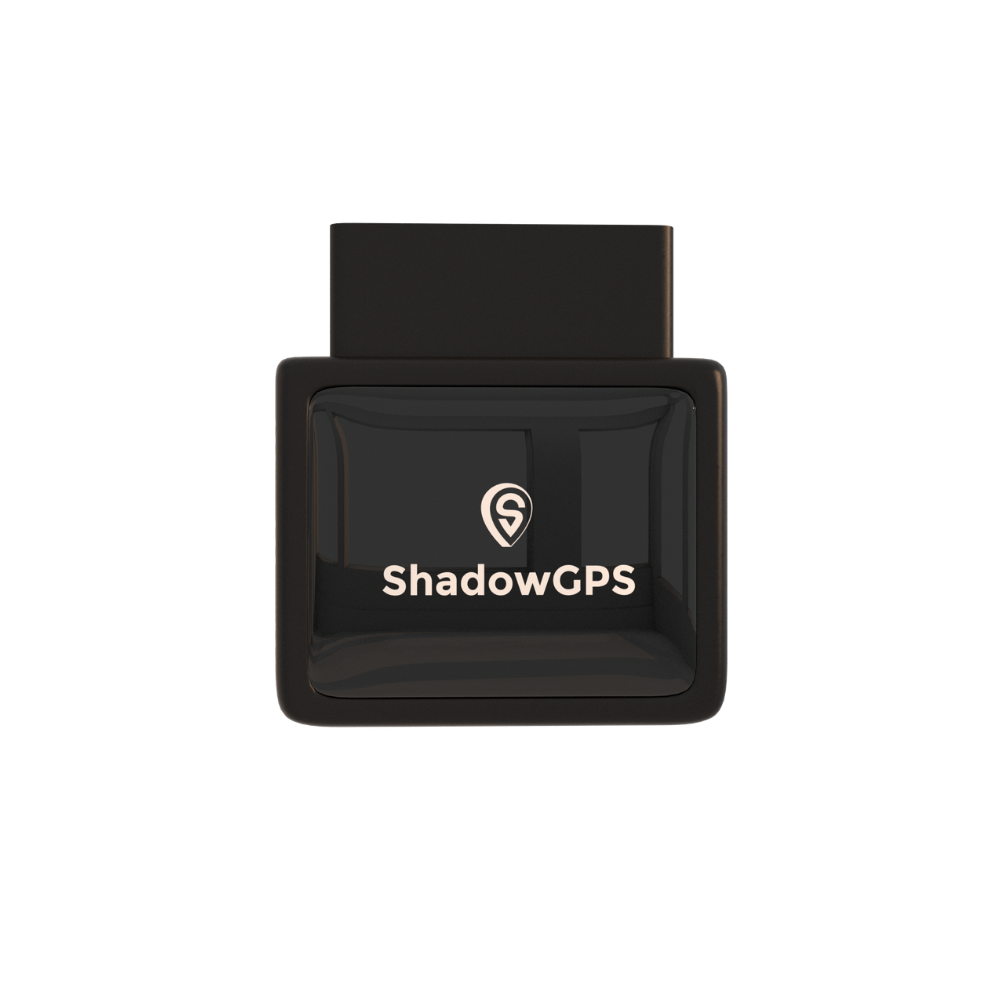
ShadowAuto
- Plugs into your parent's car in under 2 minutes, no tools
- Trip timeline and route replay for unusual routes or late-night drives
- Geofencing and movement alerts sent straight to your phone
 Buy Now on Amazon
ShadowTrack is the same idea without the port. It's battery powered in a weatherproof magnetic case, so it works on an older car with no accessible OBD-II port, or on a second car that only comes out on weekends. It holds roughly 15 days per charge and reports on the same 5-second refresh.
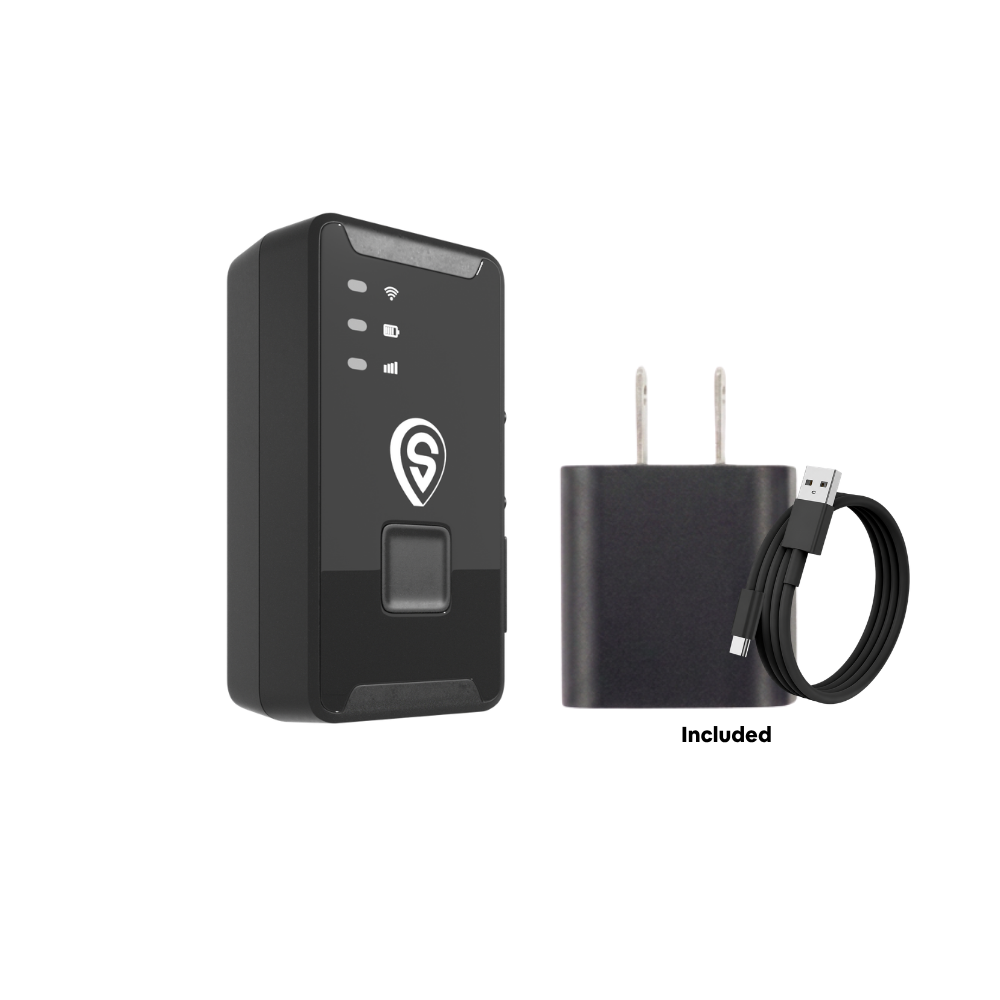
ShadowTrack
- No OBD-II port needed, mounts in seconds
- Weatherproof magnetic case, moves between cars easily
- Same 5-second refresh and trip history as ShadowAuto
Best for: families who want your parent's car covered alongside whichever wearable they choose below. Pick ShadowAuto for a daily driver with an OBD-II port, ShadowTrack for an older or occasional car without one. Neither replaces a wearable if your parent is at risk of wandering on foot.
Why Families Turn to GPS Trackers for Elderly Parents

Aging doesn't come with a warning system. One day your parent is fine to live alone, and the next you're noticing they got lost driving to a store they've visited for 20 years. A GPS tracker for elderly loved ones exists to close that gap between "probably fine" and "definitely safe," without putting them in a facility or taking away their independence.
The numbers explain the urgency. According to the Alzheimer's Association, roughly six in ten people living with dementia will wander at least once, often repeatedly, and the behavior can start at any stage of the disease. When someone isn't found within the first 24 hours, the odds of a safe recovery drop sharply. That's the "golden hour" caregivers talk about: the earlier you know an exact location, the faster help arrives.
This isn't only about dementia, either. A tracking device for elderly parents who are simply aging in place gives caregivers the ability to check a loved one's location remotely, confirm they made it home from a walk, or get an automatic alert if they take a fall and don't get up. SafeWise, one of the most cited independent safety-research groups in the U.S., has factored into safety decisions for more than 10 million homes and people through its ongoing device testing, and its senior-safety researchers consistently point to the same conclusion: a tracker doesn't replace independence, it protects it.
Living alone
Confirms a parent got home safely, went out for their usual walk, or hasn't left the house at an unusual hour.
Memory challenges
Sends an immediate safe zone alert the moment a loved one with dementia leaves a familiar area.
Fall risk
Automatically detects a hard fall and notifies caregivers, even if the person can't press a button.
Key Features to Prioritize in a GPS Tracker for Elderly Parents
Not every "GPS tracker" on Amazon is built for a person. Some are designed for luggage or pets and simply weren't tested for the specific risks that come with aging or memory loss. Before you buy, check for these features.
- Real-time GPS tracking: live location updates through a smartphone app, not a location from an hour ago.
- Geofencing / safe zone alerts: an automatic notification the instant your loved one leaves a defined "safe zone" like home or a care facility.
- SOS button: a physical button that instantly alerts caregivers or first responders, no app-fumbling required.
- Fall detection: automatically senses a hard fall and alerts caregivers even when the wearer can't ask for help themselves.
- Two-way voice communication: lets a caregiver talk directly to their loved one through the device, not just see a dot on a map.
- Battery life: look for at least 24 to 72 hours per charge; a device that dies overnight is a device that fails right when it's needed.
- Comfort and form factor: a watch, clip, pendant, or shoe insert your parent will actually keep wearing, day after day.
- Water resistance and durability: daily life doesn't pause for weather, showers, or dishwashing.
What we prioritized in this guide
We weighed real-time location accuracy, comfort and wearability, battery life, SOS/fall-detection reliability, ease of use for both the wearer and the caregiver, and total cost (device plus monthly plan) against publicly available manufacturer specs and independent reviews from sources like SafeWise and Caring.com.
Best GPS Trackers for Elderly Parents in 2026
1. AngelSense
AngelSense was built specifically for people who can't safely manage their own device, which is exactly why it's the top pick for elderly parents living with dementia or Alzheimer's. The tracker attaches to clothing with locking pins that require a special tool to remove, so it stays on even if your parent doesn't remember what it's for or tries to take it off.
Its standout feature is "Runner Mode": once activated, the device updates location every 10 seconds so you can follow your loved one's exact route in real time and loop in family or law enforcement through a shareable emergency link. AngelSense also offers fall detection as an add-on, two-way voice so you can talk directly through the device, and automatic safe zone alerts the moment your parent leaves a familiar area.
Pros
- Locking, hard-to-remove design ideal for dementia
- 10-second updates in Runner Mode
- Two-way voice and unlimited guardian access
Cons
- One of the pricier plans in this category
- Fall detection is a paid add-on, not standard

Best for: parents or grandparents with dementia, Alzheimer's, or a history of wandering, especially if they'd remove a watch or pendant.
2. Tranquil GPS Watch
Some seniors flatly refuse anything that looks "medical." Tranquil solves that problem with a watch that's genuinely hard to distinguish from a luxury timepiece, in a real metal case with a leather strap, while quietly running full GPS tracking underneath.
Its 7-day battery lasts far longer than most competitors, which matters if your parent forgets to charge devices overnight. A locking clasp (with a separate removal key) helps if they're prone to taking things off, and an SOS button routes down a pre-set contact list until a real person answers.
Pros
- Full week of battery life on a single charge
- Looks like a genuine watch, higher acceptance rate
- Fully waterproof, optional locking strap
Cons
- High upfront device cost
- No built-in fall detection

Best for: socially active seniors or those in early-to-mid dementia stages who will only wear something that looks like a real watch.
3. Theora Connect
Theora Connect splits the difference between a medical device and a normal smartwatch. It's lightweight (about 2 ounces), water-resistant, and offers a choice of analog or digital watch faces, with AI-powered fall detection layered on top of real-time GPS.
Its optional home beacon adds a faster layer of protection: when the watch moves more than roughly 75–100 feet from the beacon (typically placed near the front door), caregivers get an alert almost immediately, rather than waiting on the next GPS ping. The tradeoff is charging discipline. Battery life runs 18 to 24 hours, so it needs a nightly charge.
Pros
- AI-driven fall detection tuned to reduce false alarms
- Optional door beacon for near-instant "left home" alerts
- No long-term contract
Cons
- Needs charging every 18–24 hours
- Standard GPS updates every 15 minutes outside emergency mode

Best for: caregivers who want fall detection plus GPS in a genuinely wearable, non-stigmatizing smartwatch, and who can manage a nightly charging routine.
4. Jiobit
Jiobit (now part of Life360) skips the watch format entirely. The tiny, lightweight tracker clips onto a belt loop, purse, cane, or walker, which makes it a good option for a parent who refuses to wear jewelry or a watch of any kind.
It blends cellular, Wi-Fi, Bluetooth, and GPS to balance accuracy with battery life, delivering real-time updates roughly every 8-10 seconds in live tracking mode, with battery life stretching to about 5-7 days in normal use and up to 30 days in power-save mode.
Pros
- Small, light, and easy to clip onto almost anything
- Long battery life in power-save mode
- Lower entry cost than most watch-style trackers
Cons
- Clip-on design is easier to remove than a locking strap
- No fall detection or two-way voice

Best for: more independent seniors in early-stage memory decline who need discreet, everyday monitoring without a watch or medical-looking device.
5. GPS SmartSole
Some seniors remove every visible device: watches come off, pendants get left on the nightstand, clip-ons get unclipped. GPS SmartSole solves that specific problem by hiding the tracker inside a shoe insole, so there's nothing to see, take off, or forget to wear.
Because the wearer needs to actually be wearing shoes for this to work, it's best treated as one layer of a broader safety plan rather than a sole solution, but it's uniquely effective for the person who has defeated every other tracker you've tried.
Pros
- Completely hidden, nothing visible to remove
- Ideal for wearers who reject watches, clips, and pendants
Cons
- Only works if shoes are being worn
- No SOS button or two-way voice

Best for: a loved one who has removed or lost every watch, clip, or pendant tracker you've tried so far.
6. Apple AirTag & Samsung SmartTag
These belong in this guide because people search for them constantly, not because they're a substitute for a dedicated safety device. Both rely on nearby phones in the Find My or SmartThings network to relay location, so there's no independent cellular connection, no SOS button, and no fall detection. Coverage gets unreliable in rural or low-traffic areas.
Where they do make sense: as a zero-subscription, low-cost backup clipped to a keychain or bag, in addition to a real GPS tracker, not instead of one.


Best for: a cheap, no-subscription secondary tag, never as your primary safety device for someone at real risk of wandering.
Comparison Table: Best GPS Trackers for Elderly Parents
| Tracker | Best For | Battery Life | Fall Detection | SOS Button | Est. Monthly Cost |
|---|---|---|---|---|---|
| AngelSense | Dementia / wandering | 1–2 days | Add-on | Yes | ~$35–$65/mo + device |
| Tranquil GPS Watch | Dignified, watch-style wear | Up to 7 days | No | Yes | ~$45–$55/mo + device |
| Theora Connect | Smartwatch + fall detection | 18–24 hours | Yes (AI-based) | Yes | ~$30/mo + device |
| Jiobit | Discreet, active seniors | 5–7 days (30 in power-save) | No | No | ~$8–$15/mo + device |
| GPS SmartSole | Removes other wearables | 2–4 days | No | No | ~$25–$30/mo + device |
| Apple AirTag / SmartTag | Low-cost backup only | ~1 year (coin cell) | No | No | No subscription |
Pricing and specs sourced from manufacturer and third-party review data current as of mid-2026; confirm exact plan pricing on each brand's site before purchasing, since tiers and promotions change often.
GPS Watch vs. Clip-On vs. Insole: Choosing the Right Form Factor
The "best" GPS tracker for elderly parents isn't the one with the most features, it's the one your parent will actually keep on their body. Match the form factor to how much they'll tolerate wearing something new, and how far along any memory condition is.
- GPS watch: best acceptance rate because it looks familiar. Good for early-to-mid dementia or seniors who are simply aging in place.
- Clip-on tracker: good for seniors who reject anything worn on the wrist but are still cooperative about clothing or a bag.
- Locking pendant/pin: best for later-stage dementia, where the wearer may not remember to keep a device on and shouldn't be able to remove it.
- Shoe insole: a last resort for wearers who have removed every other type of device, since it only works while shoes are on.
How Much Do GPS Trackers for Elderly Parents Cost?
Most GPS trackers for elderly loved ones follow a two-part pricing model: an upfront device cost, plus a monthly service or data plan (since most rely on a built-in cellular connection to send location data, similar to a cell phone). Expect to pay somewhere between $30 and $250 upfront depending on the device, and $8 to $65 per month depending on features like fall detection and two-way voice.
Devices with a locking, non-removable design and clinical-grade features like AngelSense or Tranquil tend to sit at the higher end of both device and monthly cost. Simpler clip-on trackers like Jiobit are cheaper on both fronts but skip fall detection and SOS calling. Bluetooth-only tags like AirTag have no monthly fee at all, but also no independent cellular connection, so they only work well near other connected devices.
GPS Tracker vs. Medical Alert Device: What's the Difference?
Featured snippet: quick answer
A GPS tracker focuses on location, telling you exactly where your loved one is and alerting you if they leave a safe zone. A medical alert device focuses on emergency response, connecting the wearer to a 24/7 monitoring center (or direct family contacts) with the push of a button. Many newer devices, like Theora Connect and some medical alert smartwatches, now combine both functions in one wearable.
If your parent's biggest risk is wandering or getting lost, weight your decision toward GPS accuracy and geofencing. If their biggest risk is a fall or medical emergency at home, weight it toward SOS response time and fall detection, and consider whether you want alerts to go straight to family or to a professional monitoring center first.
How to Talk to Your Elderly Parent About Wearing a GPS Tracker

The device only helps if your parent actually wears it, and that starts with how you bring it up. Approach the conversation with love and respect, not as a unilateral decision made about them.
Involve them directly. Show them a couple of options, listen to what they don't like about each, and answer their questions honestly, including the ones about privacy. Most resistance comes from feeling controlled, not from the technology itself. Frame the device around their safety and independence, not your anxiety.
A script that's worked for other caregivers
"Mom, I found this little device that would help me feel better when you're out walking. It just lets me see that you're okay. I'd wear one too so you could check on me. Can we try it for a week and see how it feels?" It acknowledges your worry, not their decline, offers reciprocity, and makes the ask temporary and low-pressure. Most seniors agree to at least a one-week trial, and most forget the device is even there after that.
If your parent lives with dementia and can no longer meaningfully consent, and you hold power of attorney or legal guardianship, you can authorize tracking on their behalf. The National Institute on Aging lists GPS tracking as a recommended safety measure for dementia patients at risk of wandering, which can help settle any guilt about the decision.
Setting Up Safe Zones and Geofencing Alerts Correctly
A geofence, sometimes called a safe zone, is a virtual boundary you draw around a location, like your parent's home, a sibling's house, or a favorite park. The tracker sends an instant alert the moment that boundary is crossed. Getting this right matters as much as picking the device itself.
- Set the safe zone slightly larger than the property line to avoid false alerts from GPS drift.
- Add secondary safe zones for places they visit often, like a daughter's house or a senior center.
- Add every adult child or caregiver as a contact, so whoever is closest can respond first.
- Test the alert once, deliberately, so you know what it looks and sounds like before a real emergency.
This is also where multiple-caregiver households benefit most. If three or four siblings are sharing caregiving duties, a tracker with multi-user app access means everyone can check Mom's location instead of texting each other "have you heard from Mom today?"
When Your Elderly Parent Still Drives: Don't Forget the Car
Wearable trackers cover your parent's body, but if they're still behind the wheel, their vehicle is its own safety story. Unusual routes, long stops in parking lots, or late-night drives can be early signs of confusion, and a vehicle GPS tracker gives you that visibility without riding along.
This is a different category of device than the wearables above (ShadowGPS makes plug-in and portable vehicle trackers rather than wearable ones), but it's worth knowing it exists as a companion layer, especially in the "still driving but slowing down" stage many families go through before the wearable-tracker conversation even starts. We've written more about that transition and about combining vehicle and personal safety for aging parents:
- My dad is 74 and still drives every day: how I keep tabs without taking his keys
- Family safety: GPS tracking for elderly parents and teen drivers
And if the conversation itself, not just the device, is where you're stuck, our companion guide goes deeper on scripts and consent scenarios: Best GPS tracker for elderly parents: a caregiver's complete guide. For personal trackers beyond the picks above, see our broader roundup of GPS tracker devices for a person.
Frequently Asked Questions
What is the best GPS tracker for an elderly parent with dementia?
AngelSense is generally considered the strongest option for dementia care because of its locking, hard-to-remove clip and 10-second location updates in emergency mode. Tranquil's 7-day battery and watch-like design are worth considering if your parent will accept a wearable but would remove anything clinical-looking.
Do GPS trackers for elderly need a monthly fee?
Most cellular GPS trackers for people, including every wearable in this guide except AirTag and SmartTag, require a monthly data or service plan, typically $8 to $65 depending on features. Bluetooth-only tags like AirTag have no subscription but also no independent cellular connection.
Is it legal to put a GPS tracker on an elderly parent without their knowledge?
Laws vary by state, but generally you can track a family member who consents, or one you have legal authority over through power of attorney or guardianship if they can no longer consent due to dementia. If your parent is mentally competent, it's both more effective and more respectful to have the conversation openly rather than track them secretly.
How long does the battery last on a GPS tracker for elderly?
It varies widely by device. Most standard GPS watches run 18 to 24 hours per charge and need nightly charging. Some, like the Tranquil Watch, extend to about 7 days, and clip-on trackers like Jiobit can stretch to around 30 days in power-save mode. Aim for at least 24 to 72 hours as a practical minimum.
What's the difference between a GPS tracker and a medical alert device?
A GPS tracker is built around location: knowing exactly where your loved one is and getting alerted if they leave a safe zone. A medical alert device is built around emergency response: connecting them to help, often a monitoring center, at the push of a button. Several newer devices combine both.
How do I get my elderly parent to agree to wear a GPS tracker?
Involve them in choosing the device, frame it around your peace of mind rather than their decline, offer to wear one yourself, and propose a short, low-commitment trial period like one week. Most resistance softens once the device stops feeling like a punishment and starts feeling like a shared safety habit.
Can I track my elderly parent using just their smartphone?
Yes, apps like Find My (iPhone) or Google's Find Hub (Android) can share a phone's live location with family, and cost nothing extra. The tradeoff is that it only works if your parent keeps the phone charged and carries it consistently, which is often unreliable with memory challenges. A dedicated wearable removes that dependency.
What happens if my elderly parent removes or loses the tracker?
Most apps send an alert if the device loses power or connection unexpectedly. For higher wandering risk, choose a locking design like AngelSense or Tranquil's locking strap, which require a special tool to remove, rather than a clip-on or pendant that can be easily taken off.
Summary: The Best GPS Trackers for Elderly Parents at a Glance
AngelSense wins for dementia and wandering risk with its locking design and 10-second emergency updates. Tranquil GPS Watch wins for battery life and dignified, watch-like design. Theora Connect wins for combining fall detection with a genuine smartwatch feel. Jiobit wins for discreet, budget-friendly clip-on tracking. GPS SmartSole wins for wearers who remove every other device. Whichever you choose, prioritize real-time GPS, geofencing, an SOS button, and at least 24 hours of battery life, then involve your parent in the decision from the start.
Also keeping an eye on a parent's car?
If Mom or Dad is still driving, a vehicle GPS tracker adds a second layer of visibility, unusual routes, long stops, late-night trips, alongside whatever personal tracker you choose above.
This guide covers wearable personal trackers for seniors. Pricing, specs, and feature availability change frequently; confirm current details on each manufacturer's site before purchasing. Amazon links are affiliate links; ShadowGPS may earn a commission at no extra cost to you. Wandering and recovery statistics are published figures from the cited organizations, not guarantees. Nothing here is legal or medical advice; confirm the tracking and consent rules in your state. Last updated August 2026.

