

Your crew trucks are where the day actually happens. They carry the people, the tools, and the materials from the yard to the job site and back, and every one of them is out of your sight from the moment it pulls out of the lot.
GPS tracking for construction vehicles closes that gap. A small tracker in each pickup, van, or dump truck shows you where every truck is, when it reached the job, and where it went after hours, all from one app on your phone.
This guide is about the trucks your crew drives, not the machines on site. If you want to track excavators, generators, or trailers parked on a job, our GPS tracking for construction equipment guide covers that side. Here we focus on the road fleet: the real benefits, which tracker fits which truck, and how to roll it out without losing your crew's trust.
GPS tracking for construction vehicles gives a contractor live location, job-site arrival and departure times, after-hours use alerts, theft alerts, and engine-code warnings for every crew truck. For pickups, vans, and light-duty trucks, a plug-in OBD-II tracker like ShadowAuto is the simplest option. For heavier trucks without an OBD-II port, a hidden battery tracker like ShadowTrack does the same job. Expect $12 to $15 per truck per month, with no contract.
Why Construction Trucks Need Their Own Tracking Plan
Most construction tracking content lumps everything together: trucks, excavators, light towers, and tool trailers. That's a mistake, because they create different problems.
A skid steer mostly sits on one site. A crew truck moves all day, has a driver behind the wheel, burns fuel on public roads, and can end up anywhere on a Saturday. Tracking your trucks is about the day's movement and the people driving them, not just recovering a stolen asset.
Crew pickups and vans
Move between the yard, supply house, and two or three sites a day. The biggest wins are arrival times, dispatch, and after-hours use.
Service, flatbed, and dump trucks
Expensive to run and expensive to lose. The biggest wins are safer driving, engine-code warnings, and theft alerts.
Trailers behind them
Unhitched and left on site, often loaded with tools. A hidden battery tracker keeps them on the same map as your trucks.
9 Benefits of GPS Tracking for Construction Vehicles

These are the benefits that actually show up in a small contractor's week, ordered by how often they come up, not by how impressive they sound.
1. Send the closest truck, not the one you remember
A client calls with a leak, a failed inspection, or a delivery that needs a signature. Instead of calling three foremen to ask where they are, you open the map and see which truck is nearest.
That saves drive time on every reroute, and it keeps your crew working instead of answering "where are you?" texts all day.
2. Verified job-site arrival and departure times
Set a geofence, a virtual boundary, around each active job site. You get an alert when a truck enters and leaves, and the trip timeline keeps a record of it.
- Timesheets: compare clock-in times to when the truck actually reached the site.
- Billing disputes: when a client says "your guys left at noon," you have the trip record, not your word against theirs.
- Crew protection: the same record backs up a crew that really did show up on time.
3. Catch after-hours and weekend use
A company truck used for side jobs or personal errands costs you fuel, miles, wear, and liability you never agreed to carry. Draw a geofence around your yard and turn on alerts for movement outside working hours.
Most crews stop the habit within a week of knowing the trucks are tracked. That's the point: the tracker sets an expectation, it doesn't need to catch anyone.
4. Protect loaded trucks, not just the truck
A crew truck parked overnight often carries more value in tools than the truck itself is worth on paper. Full-size pickups also show up year after year on the National Insurance Crime Bureau's most-stolen vehicle lists.
ShadowAuto's Car Alarm alerts your phone if the truck moves when it shouldn't, so you know right away and can hand police a live location instead of a guess. See our geofence alert setup guide for the exact settings that work overnight.
5. Safer driving in heavy, loaded trucks
Construction had more fatal work injuries than any other U.S. industry in 2023, and transportation incidents caused 22.3% of them, according to the Bureau of Labor Statistics. A pickup towing a loaded trailer handles very differently from an empty one.
Trip replay shows the route and timing of any drive, which turns a vague "slow down out there" into a specific, fair conversation about one road and one trip.
6. Engine codes before a truck strands a crew
A truck that won't start at 6 a.m. idles an entire crew. Because ShadowAuto plugs into the OBD-II port, it can read engine trouble codes and flag them in the app, often before a warning light turns into a tow.
Learn more in our guide to reading engine diagnostics remotely.
7. Mileage and usage records without the logbook
Every trip is logged automatically with its route and distance. That helps you schedule oil changes and tire rotations by real miles, answer your insurer's yearly questions about how the trucks are used, and keep cleaner records at tax time.
8. Better answers for your clients
Homeowners and general contractors want to know when your crew will arrive. With Share Location, you can send a client a live link to the truck heading their way, which cuts the "are they still coming?" calls to your office.
9. See which trucks you actually need
After a month of trip data, patterns show up. One truck runs every day, another sits in the yard three days a week. That tells you whether to add a truck, sell one, or shift a crew before you spend money on another payment.
The Trackers We Built for Crew Trucks
ShadowAuto: plug it in and every truck is on the map
Most pickups, vans, and light-duty trucks built for the U.S. market since 1996 have a standard OBD-II port under the dashboard. ShadowAuto plugs straight into it. There's no wiring, no installer appointment, and no truck out of service for the afternoon. Not sure where the port is? Here's how to find your OBD-II port in 30 seconds.
It runs on the truck's own power, so there's nothing to charge, and it brings live tracking, trip timeline, trip replay, geofence alerts, Car Alarm, and engine codes into one app and web dashboard your office and foremen can share.
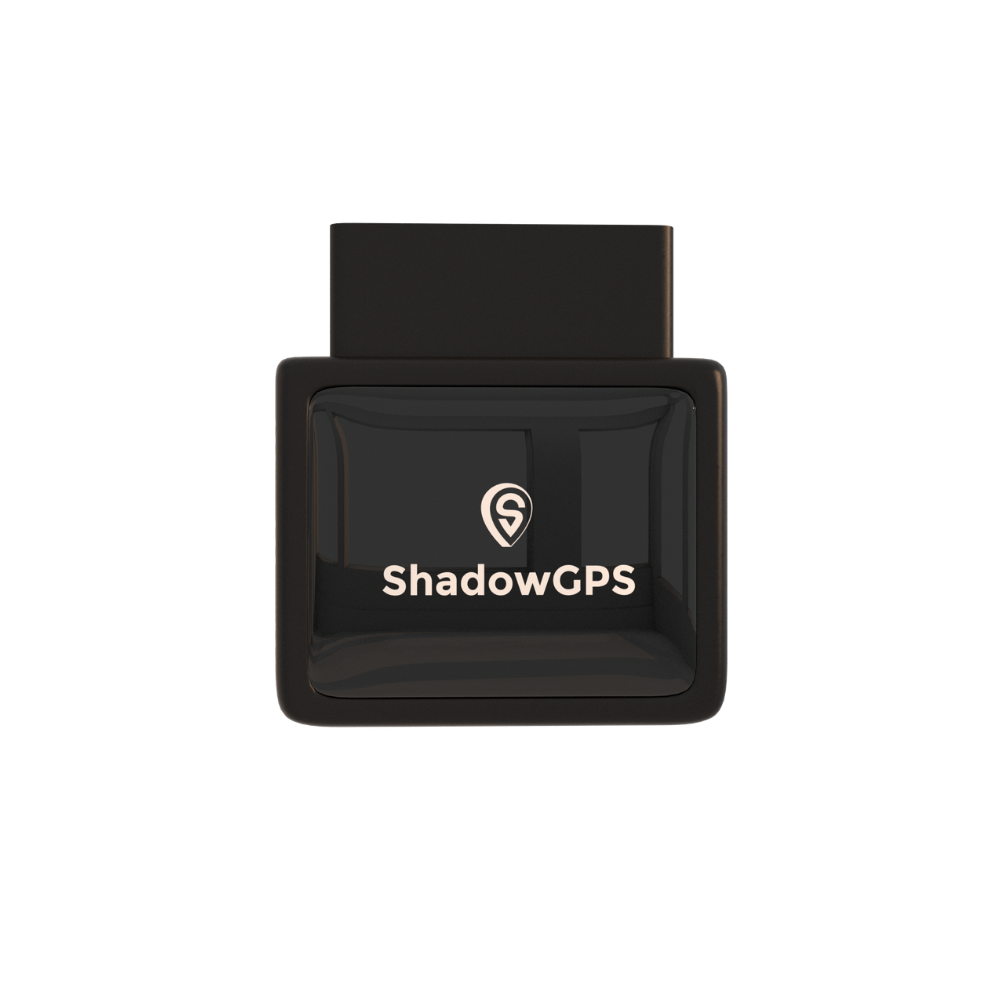
ShadowAuto
- Plugs into the OBD-II port in under 2 minutes, no tools
- Live tracking, trip timeline, and trip replay
- Engine codes, Car Alarm, and geofence alerts


Why it fits a crew truck
- No installer, so a whole crew can be set up in one morning
- Truck-powered, nothing to recharge
- Moves to a new truck when you swap one out
Know before you buy
- Needs an OBD-II port, which many heavy trucks don't have
- Visible under the dash unless you use a low-profile spot
- Not an ELD, so it doesn't replace hours-of-service logging
Best for: contractors running pickups, crew cabs, work vans, and light-duty service trucks who want every truck on one map by the end of the day.
ShadowTrack: for trucks without an OBD-II port
Many heavier dump trucks and tractors use a round 9-pin diagnostic port instead of OBD-II. For those, and for the trailers your trucks tow, ShadowTrack is the simpler route. It's battery-powered, so it hides in the cab, a toolbox, or a frame rail in a magnetic weatherproof case, and it shows up on the same map as your ShadowAuto trucks.
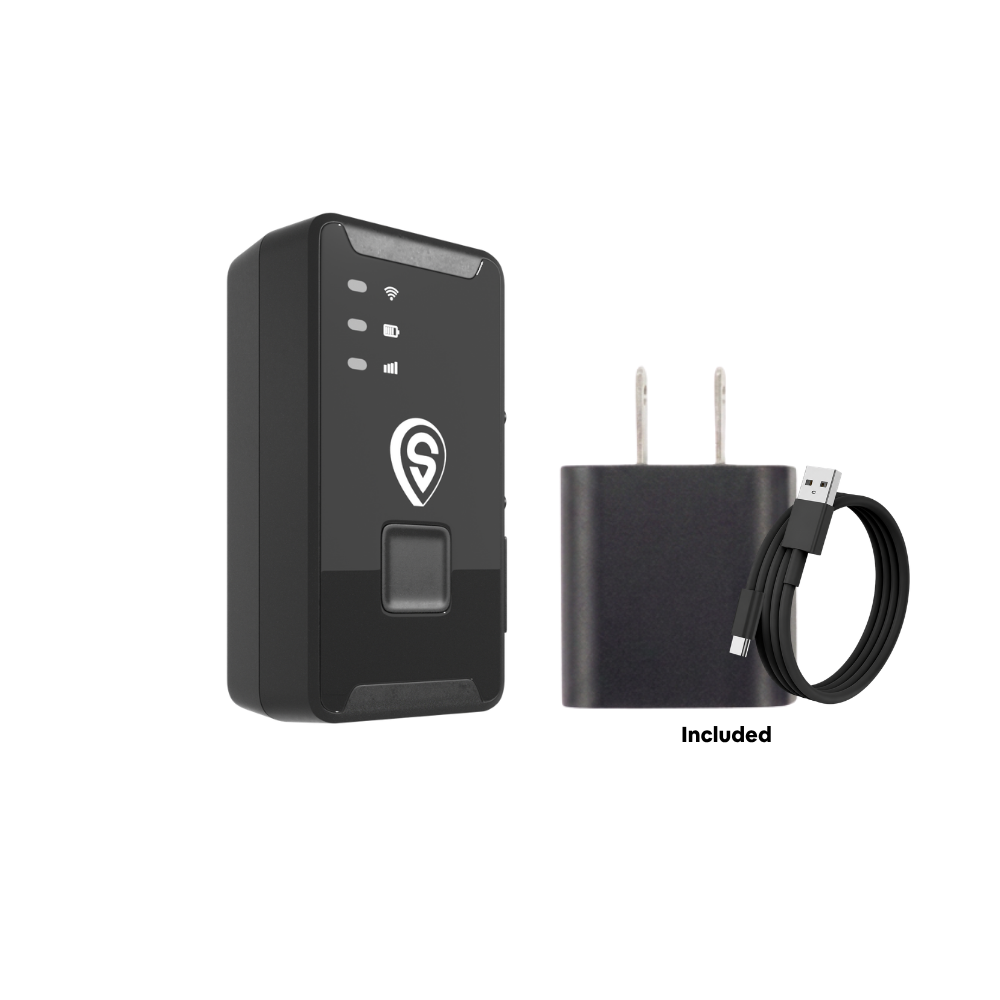
ShadowTrack
- No port or wiring needed, hides in under 2 minutes
- Up to 15 days per charge
- Pairs with the weatherproof magnetic case
Best for: dump trucks, older heavy trucks, and tool trailers that need to live on the same map as your crew pickups.
Which Tracker Fits Which Construction Truck?
Match the tracker to the truck's port and power, not the other way around. This is the fastest way to plan a mixed crew fleet.
| Truck type | Typical diagnostic port | Best fit | Why |
|---|---|---|---|
| Pickups and crew cabs | OBD-II | ShadowAuto | Plug in, truck-powered, engine codes |
| Cargo and work vans | OBD-II | ShadowAuto | Same plug-in setup, no downtime |
| Light-duty service and flatbed trucks | Usually OBD-II | ShadowAuto | Check the port first, then plug in |
| Heavy dump trucks and tractors | Often 9-pin, not OBD-II | ShadowTrack | No port needed, hides in cab or frame |
| Tool and equipment trailers | None | ShadowTrack + case | Weatherproof, magnet-mount, no power |
Enterprise Fleet Platform vs. Crew Apps vs. a Plug-In Tracker
Most construction fleet GPS tracking pages are written by platforms built for 100+ vehicle fleets with a full-time fleet manager. For a contractor with a handful of trucks, the right tool looks different.
| Option | Tracks the truck itself? | Setup | Contract | Best for |
|---|---|---|---|---|
| Enterprise fleet platform | Yes | Scheduled pro setup, onboarding | Often multi-year | Large, regulated fleets |
| Crew timesheet or phone app | No, tracks the phone | App on each phone | Varies | Clock-ins, not truck location |
| Bluetooth tag (AirTag, Tile) | Only near other phones | Minutes | None | Keys and bags, not trucks |
| ShadowAuto / ShadowTrack | Yes, live | Plug in or hide, under 2 min | None, ever | Contractors with 2 to 25 trucks |
Comparison reflects typical product categories as of September 2026. Enterprise features and pricing vary by provider.
How to Roll Out GPS Tracking Across a Construction Crew
The tracker is the easy part. The rollout is what decides whether it saves you time or starts arguments. Here's a five-step plan that works for small crews.
- List every truck and trailer. Note which ones have an OBD-II port. That tells you how many ShadowAuto and ShadowTrack trackers you need.
- Tell your crew first. Explain what you're tracking (the company trucks), why (dispatch, theft, safety), and what you're not doing. Our guide on telling your crew about GPS trackers has a script you can use.
- Plug in and pair. Plug ShadowAuto into each truck's port, hide ShadowTrack on heavy trucks and trailers, and pair them in the app.
- Set three geofences. Your yard, your supply house, and each active job site. Turn on after-hours alerts for the yard.
- Review once a week. Ten minutes on Friday with the trip timeline shows idle trucks, late arrivals, and maintenance due, without micromanaging anyone day to day.
Example: a six-truck remodeling crew
Picture a contractor running five pickups and one dump truck across three active jobs. Five ShadowAuto trackers go into the pickups in one morning, and one ShadowTrack hides in the dump truck's cab. By the first Friday review, the owner can see which truck reached each site first, which one sat in the yard two days that week, and whether anything moved over the weekend. No office staff, no new software to learn.
What Construction Fleet GPS Tracking Costs
ShadowAuto and ShadowTrack are $69.90 per tracker, with plans at $12 to $15 per month, or $10 to $13 per month once you run 4 or more trackers. No contract, ever. Go month-to-month, or prepay and save.
Enterprise fleet platforms usually quote per vehicle and often require a multi-year agreement. For a full breakdown across fleet sizes, see how much GPS tracking actually costs for a small fleet.
Is it legal to track your crew's trucks?
In most U.S. states, a business can track vehicles it owns. Some states, including New York, Connecticut, and Delaware, require written notice to employees before electronic monitoring, and California's Penal Code 637.7 bars tracking a vehicle without the registered owner's consent. The safe rule: track company-owned trucks, tell your crew in writing, and never track an employee's personal vehicle. Read our full guide on GPS tracking laws for employee vehicles. This is general information, not legal advice.
What About ELDs and DOT Rules?
A GPS tracker and an electronic logging device (ELD) are not the same thing. The FMCSA ELD rule applies to certain commercial drivers who must keep hours-of-service records.
- Many local construction drivers qualify for the short-haul exception and don't need an ELD. Confirm with FMCSA for your trucks and routes.
- If your drivers do need an ELD, you still need a certified ELD. ShadowAuto adds live location and alerts on top of it, it doesn't replace it.
- Pickups and vans under commercial weight limits usually fall outside ELD rules entirely.
Frequently Asked Questions
Is there a monthly fee for GPS tracking on construction trucks?
Yes. The monthly fee covers the cellular connection, the app, and the web dashboard. ShadowAuto and ShadowTrack plans run $12 to $15 per month, or $10 to $13 per month with 4 or more trackers. No contract, ever: go month-to-month, or prepay and save.
Does a construction truck GPS tracker need a SIM card?
No separate SIM card is needed. The cellular connection is built into the tracker and included in the monthly plan, so it works as soon as you plug it in and pair it with the app. More detail in does your GPS tracker need a SIM card.
How do I put a GPS tracker in a work truck?
For pickups, vans, and light-duty trucks, plug ShadowAuto into the OBD-II port under the dashboard. It takes under 2 minutes with no tools, no wiring, and no installer. For trucks without an OBD-II port, hide or magnet-mount ShadowTrack instead.
Can I track a dump truck that doesn't have an OBD-II port?
Yes. Many heavier dump trucks and tractors use a round 9-pin diagnostic port instead of OBD-II. A battery tracker like ShadowTrack does not need any port, so you can hide it in the cab or magnet-mount it to the frame in a weatherproof case.
Is it legal to GPS track my company's construction trucks?
In most U.S. states, a business can track vehicles it owns. Some states, including New York, Connecticut, and Delaware, require written notice to employees before electronic monitoring. Tracking a vehicle you do not own, or an employee's personal vehicle, is where legal risk begins. Check your state's rules and tell your crew up front.
Is GPS tracking mandatory for construction vehicles?
There is no federal rule requiring GPS trackers on construction vehicles. Separately, the FMCSA electronic logging device rule applies to certain commercial drivers who must keep hours-of-service records, and many local construction drivers qualify for the short-haul exception. A GPS tracker is not an ELD, so if your drivers need one, you need a certified ELD in addition.
How fast does a ShadowGPS tracker update?
ShadowAuto and ShadowTrack update every 5 seconds while the truck is moving, on every plan. That is fast enough to follow a truck turn by turn, not just see where it was a few minutes ago.
Can I see my trucks and my equipment in the same app?
Yes. ShadowAuto trackers in your trucks and ShadowTrack trackers on trailers or equipment all show on one map in the ShadowGPS app and web dashboard. For the equipment side, see our construction equipment tracking guide.
Put every crew truck on one map this week
Plug it in, see it move, cancel any time. No installer, no contract, ever.
Pricing and specs current as of September 2026 and subject to change. Fatality figures from the U.S. Bureau of Labor Statistics Census of Fatal Occupational Injuries, 2023. ELD rules summarized from FMCSA public guidance; confirm requirements for your own trucks and routes. Legal information is general and not legal advice. Amazon and Best Buy links may be affiliate links; ShadowGPS may earn a commission at no extra cost to you.

