

Yes, you should have a GPS tracker in any car you rent out, and yes, you need to tell your renter it's there. A GPS tracker for rental cars shows you where your car is right now, where it has been, and whether it's on its way back on time. That's the whole job: certainty about a car you handed to someone else.
Renting out your car is a trust deal with a stranger. Peer-to-peer car sharing made that deal normal, and a tracker is what makes it workable. It quietly backs up both sides: the guest drives a car the owner can account for, and the owner gets a record instead of guesses if a trip goes sideways.
This guide is for the person renting out one car or a handful: a Turo host, a small local rental business, or an owner renting to a rideshare driver. You'll see what a rental car GPS tracker actually does, which type fits your setup, how to disclose it the right way, and a checklist you can run before the next trip.
The best GPS tracker for rental cars is a cellular (LTE) tracker with live tracking, trip history, geofence and tamper alerts, and no long contract. For most hosts that means a plug-in OBD-II tracker, with a battery tracker for cars where a port tracker doesn't fit. Disclose it in your listing, and skip Bluetooth tags like AirTag, which Turo doesn't allow.
What is a GPS tracker for rental cars?
A GPS tracker for rental cars is a small device that finds your car by satellite and sends its location over the cellular network to an app on your phone. Unlike a Bluetooth tag, it doesn't need a stranger's phone nearby to report in. If your renter has a cell signal, so does your tracker.
For a host, a good rental car tracker does five things:
- Live location: see where your car is during the trip, on your phone or the web.
- Trip history and replay: a timestamped record of every drive, start to finish.
- Geofence alerts: a ping when your car leaves an area you set, like your city or state.
- Tamper alerts: a ping if the tracker is unplugged or moved.
- Shared access: a co-host, partner, or second car lives in the same app.
Why car sharing runs on GPS tracking now
Peer-to-peer car sharing looks different than it did two years ago. Getaround wound down its U.S. business, including HyreCar, in February 2025. That leaves Turo as the main U.S. marketplace where everyday owners rent out their own cars, and on Turo, hosts bring their own tracker.
Turo has also written trackers into its rules. Its host tracking and technology policy allows GPS trackers, requires hosts in some locations to disclose them and get guest consent, requires a tracking device on high-value cars in some locations, and bans AirTags as an active tracker.
And while car theft is falling, it hasn't gone away. The National Insurance Crime Bureau counted 659,880 vehicles stolen in the U.S. in 2025, down 23% from 2024. That's still about one car every 48 seconds, and more than a third of thefts happen in the 10 biggest metro areas, the same places where rental demand is strongest.
6 problems a rental car GPS tracker solves
1. Late returns and "I'm almost there" messages
When a guest says they're ten minutes out, a live map tells you if that's true. You can plan the next handoff, warn the next guest early, or message the current one with facts instead of guesses. Most late-return headaches end right there, politely.
2. Trips outside what you agreed to
Maybe your listing says no out-of-state trips, or you only deliver within one city. A geofence around that area sends you an alert the moment your car crosses the line. The trip history then shows where it went, which helps when the guest's story and the odometer don't match.
3. Theft and tampering
If someone unplugs or moves the tracker, a tamper alert tells you right away, along with the last known location. If your car is taken, share its live location with police and let them handle the recovery. Never go after a car yourself. Our guide on setting up geofence alerts that catch overnight theft walks through the alert setup step by step.
4. Damage, fee, and mileage disputes
A claim with the platform goes better with records. A timestamped trip log shows when your car was driven, where, and for how long, which backs up your side of a dispute about smoking fees, late fees, or wear from a trip it wasn't listed for. GPS data can also help build a stronger case if a theft ends up in court.
5. Problems you'd rather catch between trips
A plug-in OBD-II tracker can read engine codes. If a check-engine light comes on during a trip, you'll know before you hand the keys to the next guest, not after they message you from the side of the road. That protects your reviews as much as your car.
6. Running two to five cars without losing the plot
Once you have more than one car on the platform, the hard part is logistics: which car is parked, which is out, which needs cleaning before tomorrow's pickup. One app with every car on a single map turns that into a quick glance instead of a string of texts.
The one-car host
Your daily driver or second car earns on weekends. You want to know where it is, get it back on time, and have records if a trip goes wrong.
The small rental business
Two to five or more cars across Turo and direct bookings. You need every car on one map, alerts that work while you sleep, and fast turnover.
Renting to gig drivers
Weekly rentals to rideshare or delivery drivers mean long, high-mileage trips. Trip history and geofences keep the arrangement clear for both sides.
Our picks for rental cars: ShadowAuto and ShadowTrack
ShadowAuto (OBD-II plug-in)
ShadowAuto updates your car's location every 5 seconds while it's moving, so the dot on your map is where your car is now, not where it was a few minutes ago. It plugs into the OBD-II port under the dashboard in under two minutes, with no tools and no installer. It runs on your car's power, so there's nothing to charge between guests. The result is simple: you know where your rental car is, every trip.
Not sure where your port is? Here's how to find your OBD2 port in 30 seconds.
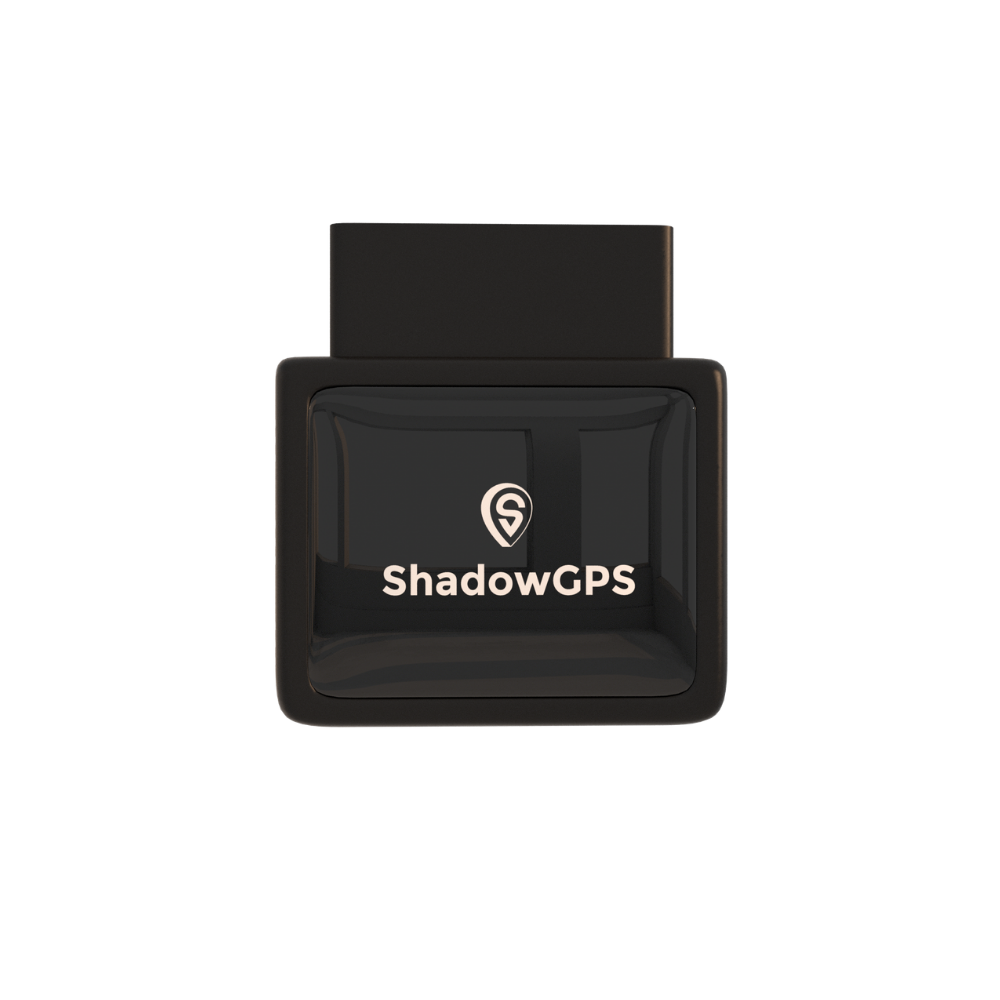
ShadowAuto
Plug-in · OBD-II · For cars, trucks & Turo
Plans $9 to $15/mo (1-3 trackers) or $8 to $13/mo (4+ trackers) · No contract, ever.
- Live tracking, trip timeline, and trip replay
- Geofence, tamper, and Car Alarm alerts
- Reads engine codes so you catch issues between trips

What hosts like
- Plugs in, nothing to charge between guests
- Trip replay doubles as a record for disputes
- Engine codes flag problems before the next pickup
- Month-to-month, cancel any time
Keep in mind
- An OBD port is reachable, so turn on tamper alerts
- Needs a monthly fee for the cellular connection
- Very old cars (pre-1996) may not have an OBD-II port
Not every rental fits the OBD route. If your car has an awkward port, you rent a pre-1996 classic, or you want a second tracker that moves between cars as your lineup changes, ShadowTrack is the battery-powered option. It tucks under a seat or magnet-mounts, and you still disclose it like any other tracker.
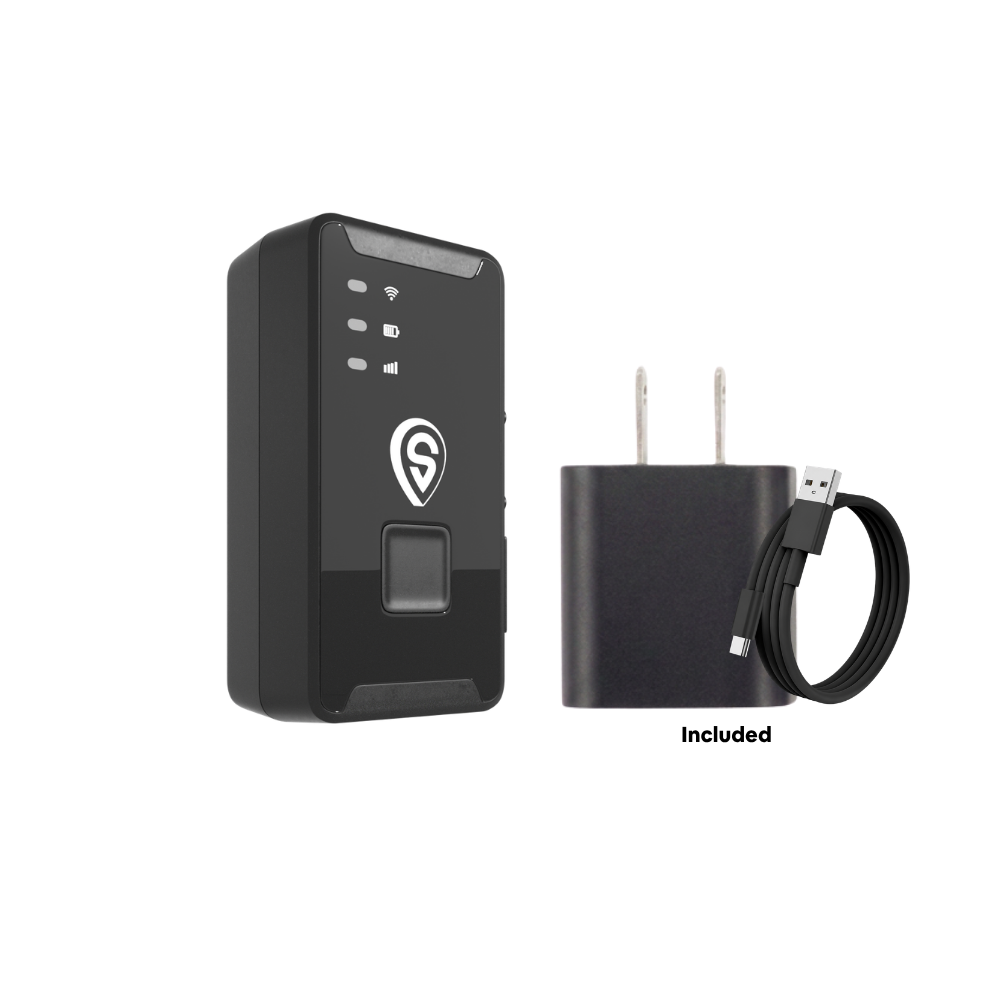
ShadowTrack
Battery · Magnet-mount · Moves between cars
Plans $9 to $15/mo (1-3 trackers) or $8 to $13/mo (4+ trackers) · No contract, ever.
- Up to about 15 days per charge
- No port needed, works in any car or trailer
- Same app, live map, and trip replay as ShadowAuto
Best for: ShadowAuto is the everyday pick for Turo hosts and small rental businesses. Add ShadowTrack for cars without an easy OBD-II port, or as a floating tracker you move between cars. Hosts running several cars can see how others do it on our Turo host page.
Which type of tracker fits your rental setup?
There are five ways to track a car you rent out. Only two of them make sense for most hosts, and one isn't allowed on Turo at all.
| Tracker type | How it goes in | Power | Best rental fit | Watch out for |
|---|---|---|---|---|
| OBD-II plug-in | Plugs into the port under the dash | Your car, always on | Turo hosts, 1 to 5+ cars | Port is reachable, so use tamper alerts |
| Battery / magnetic | Tucks away or magnet-mounts | Rechargeable battery | Cars without an easy port, backups | Charge it during turnover |
| Hardwired | Wired in by a technician | Your car, always on | Larger rental fleets | Upfront labor, hard to move between cars |
| Car maker's connected app | Built into newer cars | Your car | Newer models with an active plan | Features vary by brand and model year |
| Bluetooth tag (AirTag, Tile) | Dropped in the car | Coin battery | Not a rental tracker | No live GPS, and banned on Turo |
Want the deeper side-by-side? Our OBD2 vs. battery-powered GPS tracker guide covers it in detail.
One car on Turo
Plug in ShadowAuto, set a geofence around your normal service area, and add the disclosure line to your listing. That covers 90% of what a single-car host needs. If you used to rely on an AirTag, here's what switching to an OBD-II tracker looks like in practice.
A small rental business with 2 to 5+ cars
Put a ShadowAuto in every car so they all show up on one map, then keep one ShadowTrack as a spare for a car with a port issue or a trailer you rent alongside. Monthly rates drop once you reach four trackers, and there's still no contract on any of them.
Renting to rideshare and delivery drivers
With HyreCar gone, many owners now rent directly to gig drivers by the week. These trips are long and high-mileage, so trip history matters more than a single location check. Put tracking in your written rental agreement and have the driver sign it before handing over the keys.
Lending a car to friends or family
Informal loans still go better with a tracker, mostly for peace of mind. A quick "the car has a tracker in it, I'll be able to see if it breaks down" keeps it friendly and honest.
Other rental car trackers hosts compare
ShadowGPS isn't the only option. Here's how three popular OBD-II trackers stack up for rental use, judged on refresh speed, contract terms, and whether they keep working if they're unplugged.
1. Bouncie
Bouncie is a well-known plug-in tracker with a low monthly fee and a clean app, and a lot of hosts start here. It refreshes every 15 seconds and is OBD-only, so it stops reporting the moment someone unplugs it, with no battery option to fall back on.
Pros
- Low monthly fee
- No contract
- Simple plug-in setup
Cons
- 15-second updates
- OBD-only, no portable option
- Mixed third-party service reviews


Best for: hosts who only ever want a plug-in tracker and are fine with slower updates.
2. LandAirSea OBD
LandAirSea is a long-running U.S. tracker brand with a plug-in model. Its plans are tiered by update speed, so the fastest refresh costs more, and the best monthly rate is tied to a two-year commitment.
Pros
- Established brand
- Plug-in setup
- Several plan tiers
Cons
- Fast updates cost extra
- Best rate needs a 2-year term
- Base plans update slowly

Best for: owners who want a long-standing brand and are happy to commit for two years.
3. BrickHouse OBD
BrickHouse builds tiered plans aimed at business fleets, with more reporting features on the higher tiers. For a host with one to five cars, the plan cost adds up faster than the extra features pay off.
Pros
- Feature-rich higher tiers
- No contract
- Plug-in setup
Cons
- Higher monthly fees
- Built for bigger operations
- Update speed depends on plan

Best for: rental operators who want business reporting tiers and don't mind the higher fee.
Rental car GPS trackers compared
| Tracker | Type | Live refresh | Monthly fee | Contract | Allowed on Turo |
|---|---|---|---|---|---|
| Apple AirTag | Bluetooth tag | No live GPS | None | None | No |
| Bouncie | OBD-II | 15 sec | $9.00 to $9.65 | None | Yes, disclosed |
| LandAirSea | OBD-II / battery | 3 min to 3 sec by tier | $9.95 to $49.95 | 2 years for best rate | Yes, disclosed |
| BrickHouse | OBD-II / battery | Varies by plan | $17.99 to $34.99 | None | Yes, disclosed |
| ShadowTrack | Battery | 5 sec | $9 to $15 | None, ever | Yes, disclosed |
| ShadowAuto | OBD-II | 5 sec | $9 to $15 | None, ever | Yes, disclosed |
Competitor pricing and refresh rates are from each brand's published plans and can change. ShadowGPS rates shown for 1 to 3 trackers; 4+ trackers run $8 to $13/mo. Refresh times are while the car is moving.
How to tell renters about your GPS tracker
Disclosure isn't optional, and it builds trust
Turo requires hosts in some locations to disclose tracking devices and get guest consent, and its guest-facing policy tells renters a booked car may include a tracker to prevent theft. Many states also expect notice before you track a car someone else is driving. The simple rule: say it in your listing, and say it again before pickup.
This is general information, not legal advice. If you rent outside a platform, put tracking in your written rental agreement and check your state's rules.
Sample listing line you can adapt: "This car has a GPS tracker for security and to help locate it if needed. It records location and trip history only, with no audio or video."
Sample pre-trip message: "Hi! Quick reminder from the listing: this car has a GPS tracker for security. Enjoy the trip, and message me here if anything comes up."
A few things that get hosts in trouble:
- Using an AirTag as your tracker on Turo. Turo doesn't allow it, and iPhone users get an alert about an unknown tag anyway.
- Tracking without telling the guest. An undisclosed tracker can cost you protection-plan support and your host account.
- Adding cabin audio or cameras. Interior recording has much stricter consent rules than GPS. Keep your tracker to location and trips.
- Sharing a guest's location publicly. Trip data is for protecting your car, not for social posts.
- Going after your car yourself. Share the live location with police and let them recover it.
Rental car tracker setup checklist
Before your first guest
- Plug in or mount the tracker and confirm your car shows up on the map.
- Name each car in the app so you can tell them apart at a glance.
- Draw a geofence around your service area or state.
- Turn on tamper alerts and Car Alarm alerts.
- Add the disclosure line to your listing and rental agreement.
- Give your co-host access with Share Location.
- Take a short test drive and play it back with trip replay.
Between every trip
- Compare the trip replay against what the guest reported.
- Check for engine codes on ShadowAuto before the next pickup.
- Charge ShadowTrack if it's below about a third.
- Confirm the tracker is still online and reporting.
If a car isn't back on time
- Check the live map so you know where your car is right now.
- Message the guest through the platform so there's a written record.
- Contact the platform's support team if the guest doesn't respond.
- If you suspect theft, call the police and share your car's live location.
- Save the trip history for your claim.
What does it cost to track a rental car?
ShadowAuto and ShadowTrack are $69.90 each. After that, a monthly fee covers the cellular connection: $15 month to month, or as low as $9 a month if you prepay for two years, with lower rates once you have four or more trackers. No contract, ever. Month-to-month, or prepay and save. Full details are on the pricing page.
For a rental car, that fee buys more than a dot on a map. You get a trip record for every guest, alerts that work while you sleep, and a quick answer to the question that matters most: where is my car right now? Some owners also tell us their insurer asks about tracking every year, and a trip history makes that an easy answer. ShadowGPS backs it with 99.9% network uptime and a 30-day money-back guarantee.
Wondering about SIM cards? You don't need to buy one. Here's how the cellular connection works.
Key takeaways
- A GPS tracker for rental cars shows live location, trip history, and alerts for late returns, boundary crossings, and tampering.
- Use a cellular GPS tracker. Turo bans AirTags, and Bluetooth tags don't give live location.
- OBD-II plug-in trackers suit most hosts; battery trackers cover cars without an easy port.
- Always disclose the tracker in your listing and before pickup.
- Look for fast refresh, tamper alerts, trip replay, and no long contract.
FAQs about GPS trackers for rental cars
Do I have to tell renters there's a GPS tracker in my car?
In practice, yes. Turo requires hosts in some locations to disclose tracking devices and get guest consent, and many state laws expect notice before you track a car someone else is driving. Put it in your listing and your pre-trip message, and in your written agreement if you rent outside a platform.
Can Turo hosts use an AirTag as a tracker?
No. Turo does not allow AirTags as an active tracking device. Use a cellular GPS tracker instead, like an OBD-II plug-in or a battery tracker, and disclose it to guests.
Is there a monthly fee for a rental car GPS tracker?
Yes, real-time trackers need a monthly fee for the cellular connection. ShadowGPS plans run $9 to $15 a month for 1 to 3 trackers and $8 to $13 for 4 or more. No contract, ever. Month-to-month, or prepay and save.
Does a rental car tracker need a SIM card?
You don't need to buy or insert one. ShadowAuto and ShadowTrack connect over LTE-M on major U.S. carriers, and the monthly fee covers that connection.
What happens if a renter unplugs my OBD tracker?
You get a tamper alert along with your car's last known location. Hosts who want a backup add a battery tracker like ShadowTrack, disclosed the same way as the first one.
Can I move one tracker between rental cars?
Yes. ShadowTrack moves between cars in seconds, and ShadowAuto unplugs from one OBD-II port and plugs into another in about two minutes. Rename the car in the app so your trip history stays clear.
Will a GPS tracker show where a guest drove my car?
Yes. Trip history and trip replay show every drive with times and routes. Platforms usually rely on check-in and check-out odometer readings for mileage, and your trip record backs those up if there's a dispute.
Can I shut off a rental car remotely with a GPS tracker?
Some hardwired systems include a starter cutoff, but ShadowGPS trackers focus on location and alerts. If your car is taken, share its live location with police. Stopping a car with a driver inside is a job for law enforcement, not the owner.
Plug it in. See it move. Cancel any time.
Know where your rental car is on every trip, with a tracker that takes two minutes to set up and no contract to sign.
Pricing and platform policies checked November 2026 and may change. Competitor details come from each brand's published plans. ShadowGPS may earn a commission on qualifying Amazon and Best Buy purchases. This article is general information, not legal advice; check your platform's rules and your state's laws before tracking a car someone else is driving.

