

You walk out of the mall, the stadium, or the airport terminal, hit the lock button, and hear nothing. Every row looks the same. Every second silver SUV looks like yours. If you have ever wandered a parking lot wondering where you left your car, you are in good company, and the fix is simpler than you think.
This guide covers how to find your car in a parking lot right now, using tools you already have, and how to make sure it never happens again. You will learn what your phone can and cannot do, why Bluetooth tags fall short in big lots, and how a GPS tracker for your car shows you exactly where it is, live, on a map.
To find your car in a parking lot, open your GPS tracker app or your phone's saved parking pin first, then press your key fob's lock or panic button and listen, retrace your steps from the entrance you used, walk the lot row by row, and ask parking staff for help. To never lose it again, plug in a GPS tracker. It shows your car's live location on your phone, works across any size lot, and alerts you if your car moves without you.
Lost Your Car Right Now? Do These 6 Things First
If you are standing in a lot as you read this, start here. These steps are ordered from fastest to slowest, so work down the list.
- Check your tracker or phone first. If your car has a GPS tracker, open the app and look at the map. If you use Apple Maps or Google Maps, look for a "Parked car" or "Saved parking" pin.
- Use your key fob. Press lock twice to trigger the horn chirp, or press the panic button for a few seconds and listen for the alarm. Most fobs reach roughly the length of a few rows, so walk while you press.
- Go back to the door you came out of. Stand where you exited the building and face the lot the same way you did when you walked in. Your memory of the walk often comes back from the same angle.
- Look at your photos. Many people snap a quick picture of a row sign or floor number and forget. Scroll your camera roll for the last hour.
- Walk the lot in a grid. Pick one end and go row by row instead of zigzagging. It feels slow, but it beats walking the same rows twice.
- Ask for help. Airport, stadium, and hospital garages usually have security staff with carts and cameras. Some can check license plate readers at the entrance.
Still nothing after a thorough search? Skip ahead to Lost, towed, or stolen before you panic.
Why Cars Get "Lost" in Parking Lots So Often
Forgetting where you parked is not a memory problem. It is a design problem. Big lots repeat the same rows, signs, and lighting, and your brain is busy with your shopping list or your flight time when you park.
The numbers back this up. A 2018 OnePoll survey of 2,000 UK drivers for Nissan found that about two thirds had forgotten where they parked at least once, and the average search took around 10 minutes. Multi-level garages topped the list of places drivers lose their cars, followed by shopping centers, supermarkets, and airports.
The same survey found that only 9% of drivers had ever used a phone to find their parked car. That gap is the whole point of this guide: the tools exist, most people just are not set up before they need them.
- Look-alike cars: Popular colors and models make every row look like yours.
- Multiple exits: Malls and stadiums have doors on every side, so you rarely leave the way you came in.
- Stacked garages: Floors look identical, and it is easy to remember the color code but not the level.
- Time: A long flight or a full day at a theme park wipes out the mental note you made that morning.
6 Ways to Find Your Parked Car, Compared
There is no single right tool for everyone. Here is how each option actually performs in a crowded lot, from free memory tricks to a dedicated GPS tracker.
| Method | Cost | Works in big lots? | Live location? | Alerts if car moves? |
|---|---|---|---|---|
| Memory tricks and photos | Free | Only if you remember to do it | No | No |
| Key fob horn or panic button | Free | Limited by fob range | No | No |
| Phone parking pin (Apple Maps, Google Maps) | Free | Yes, if it saved correctly | No, one saved point | No |
| Car maker's connected app | Often a paid plan | Yes, on supported models | Varies by brand | Varies by brand |
| Bluetooth tag (AirTag, Tile) | Low one-time cost | Depends on nearby phones | No, last seen point | No |
| ShadowAuto GPS tracker (plug-in) | Device + monthly fee, no contract | Yes, any size lot | Yes, every 5 seconds while moving | Yes |
Features of car maker apps vary by brand, model year, and plan. Check your owner's manual or app for specifics.
1. Memory tricks that actually work
These are free and surprisingly effective when you use them every time. The trick is making them a habit, not a rescue plan.
- Say it out loud: "Level 3, Blue, near the elevator." Speaking it locks it in better than reading a sign.
- Take one photo: Snap the row sign or pillar code with your car in the frame.
- Park near a landmark: A light pole, cart corral, or the end of a row is easier to find than the middle.
- Use the same zone every time: At places you visit often, like work or the grocery store, park in roughly the same area.
2. Your key fob
The horn chirp and panic alarm are the oldest tricks in the book, and they still work in small and mid-sized lots. The limit is range. In a huge stadium lot or a concrete garage, you might be too far away for the signal to reach.
3. Your phone's saved parking spot
Both Apple Maps and Google Maps can remember where you parked. On iPhone, Apple Maps can drop a parked car pin automatically when your phone disconnects from CarPlay or your car's Bluetooth. Google Maps lets you tap the blue dot and save your parking, and it can also detect parking automatically on supported phones, as Tom's Guide explains.
It is a great free option, with two catches. The pin is only as good as your phone's GPS at the moment you park, which can be off inside a garage. And it records your phone, not your car. If someone else drives your car, or your car gets moved, the pin does not change.
4. Your car's built-in connected app
Many newer cars come with a manufacturer app that shows the car's location. If yours does, it is worth setting up. Just know that features and pricing vary widely, some services end after a trial, and older or used cars often do not have this at all.
5. Bluetooth tags like AirTag and Tile
A tag such as an Apple AirTag or a Tile tucked in your glove box can help. These tags do not have their own GPS. They report their location when a nearby phone picks up their Bluetooth signal, so you see a "last seen" point, not a live position.
In a busy mall lot, that can be good enough. In an empty corner of an airport economy lot at 2 a.m., or a far level of a garage, updates can be sparse. We cover the differences in depth in GPS tracker vs. Apple AirTag: why AirTags fall short for cars.
6. A GPS tracker for your car
A GPS tracker is the only option on this list that knows where your car is, not where your phone was. It reports its own location over a cellular connection, so you can check the map from anywhere and see where your car actually sits, whether you parked it or someone else did.
That is what turns "Where did I park?" into a five-second glance at your phone. It also covers the bigger worry behind a missing car: whether it is still there at all.
How a GPS Tracker Finds Your Parked Car
Here is the simple version. A GPS tracker listens to signals from the Global Positioning System satellite network and works out its position. It then sends that position over a cellular network to an app on your phone and a web dashboard.
- Locate: The tracker calculates where your car is using satellite signals.
- Send: It sends that location over a built-in cellular connection.
- Show: Your app puts your car on the map, along with your trip timeline and the spot where it last stopped.
With ShadowGPS, the map refreshes every 5 seconds while your car is moving. So when you park, the last point on the map is right where you stopped, not a rough guess from minutes earlier.
What about multi-level and underground garages?
This is the part most guides skip, so here is the honest answer. Concrete and steel block satellite and cell signals. Deep inside a garage, any GPS device, including your phone, can lose its fix.
In practice, a tracker that updates often keeps sending your car's position as you drive in and up the ramps, so the last point on the map usually lands at or near the garage section you parked in. What GPS does not tell you reliably is which floor you are on. Pair your tracker with one quick photo of the level sign and you have every detail you need.
Garage tip that saves the most time
Before you walk away, glance at your tracker app to confirm the location landed, then snap the floor and section sign. The map tells you which garage and which side. The photo tells you the level. Together, they get you back to your car without guessing.
Which GPS Tracker Fits Your Car?
ShadowGPS makes two trackers. Both update every 5 seconds while moving, both work with the same app, and neither one locks you into a contract. The right pick comes down to whether you want to plug it in and forget it, or place it wherever you like.
ShadowAuto: plug it in and it stays on
ShadowAuto plugs into your car's OBD-II port, the same port a mechanic uses to read engine codes. It usually sits under the dashboard near the steering wheel, and if you are not sure where yours is, here is how to find your OBD-II port in 30 seconds. It draws power from your car, so there is nothing to charge, and it takes under 2 minutes with no tools.
For finding your car in a parking lot, that "always on" part matters. You never have to remember to charge it before a trip to the airport.
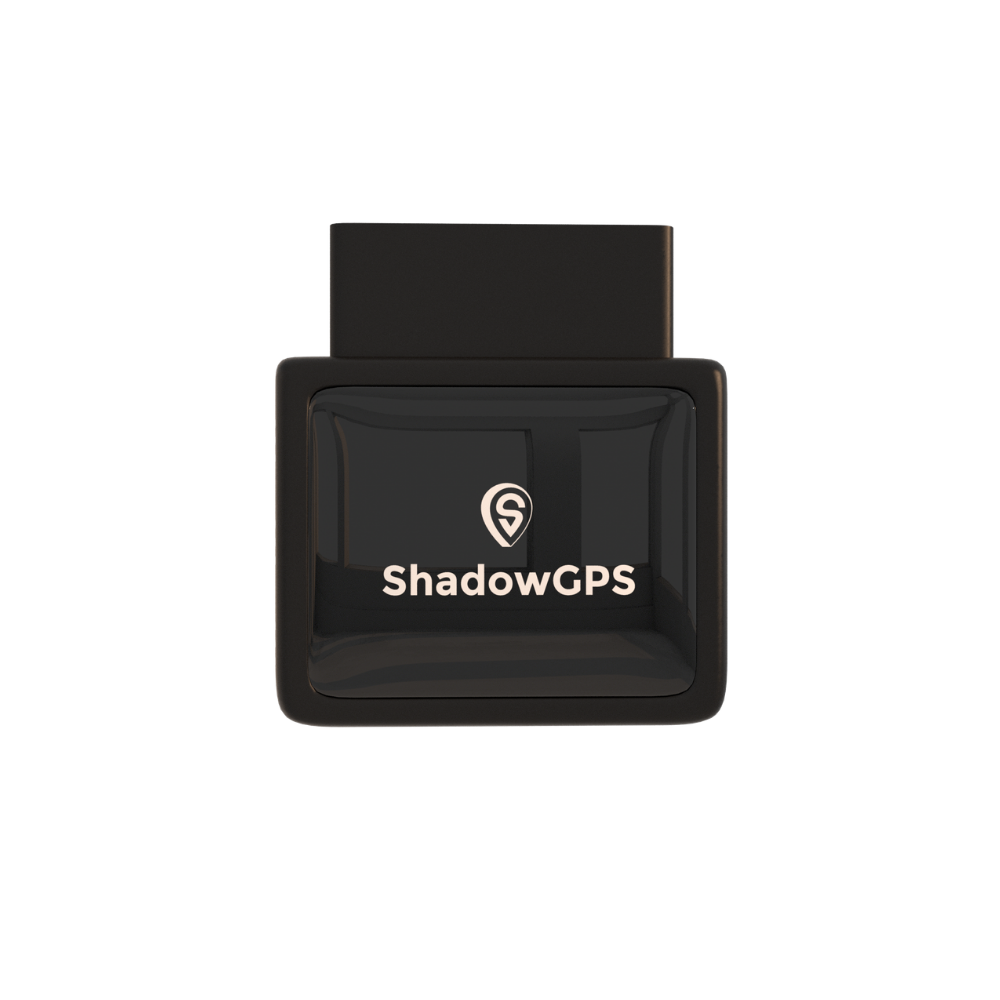
ShadowAuto
- Live location every 5 seconds while moving
- Powered by your car, never needs charging
- Car Alarm, geofence alerts, and trip replay


Best for: Your everyday car or truck, a teen driver's car, and Turo rentals where you want the tracker on every single trip.
ShadowTrack: place it wherever it makes sense
ShadowTrack runs on a rechargeable battery that lasts up to about 15 days per charge. There is no port to find. Drop it in the glove box, under a seat, or in the weatherproof magnetic case, and it reports your car's location just like ShadowAuto.
It is a good fit for older cars, cars where the OBD-II port is hard to reach, or owners who want a hidden GPS tracker for their own vehicle that a thief is less likely to spot and pull out.
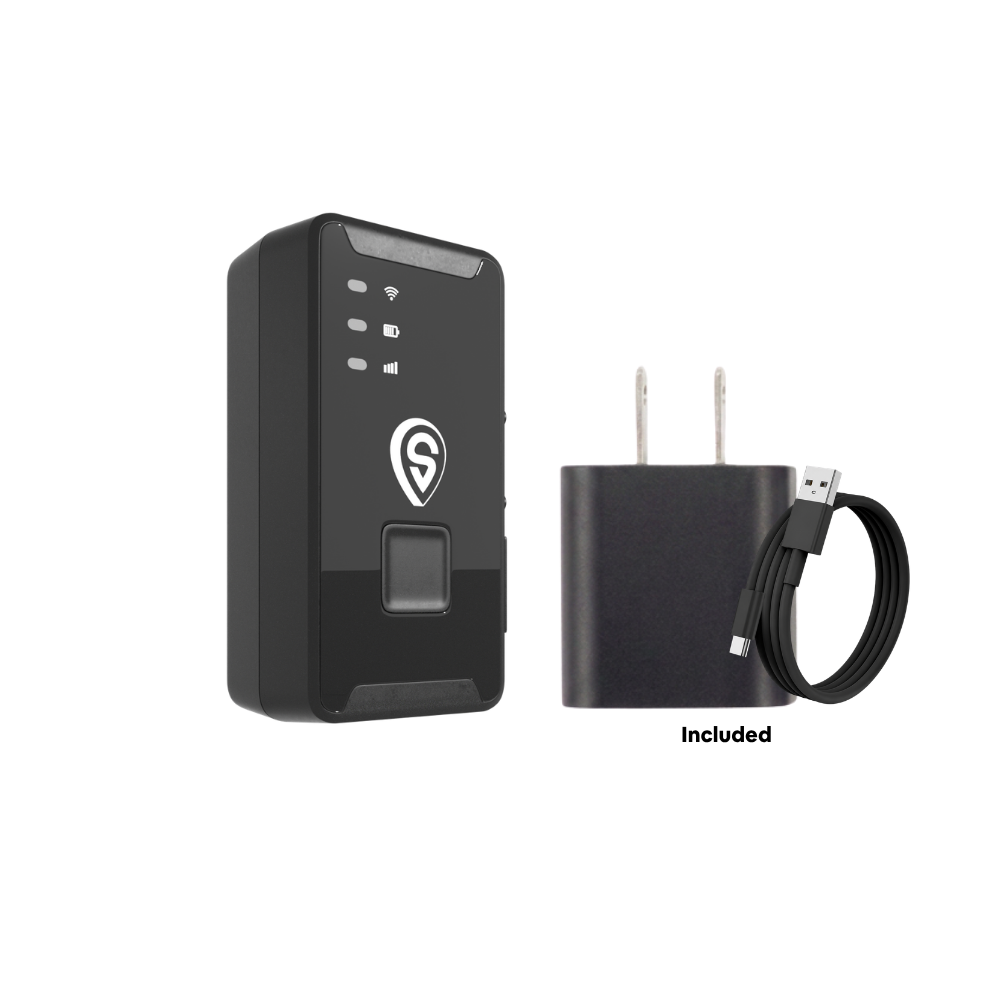
ShadowTrack
- Up to about 15 days per charge
- Weatherproof magnetic case option
- Moves easily between cars, trailers, and gear
Best for: Older cars, a second car, trailers and equipment, or anyone who wants to choose exactly where the tracker sits.
Still comparing? Our full roundup of the best GPS trackers for cars in 2026 puts both against other popular options.
7 GPS Tracker Tips for Parking Lots
Owning a tracker is step one. These habits make sure it saves you time every single time you park.
Tip 1: Check the map before you start walking
Open the app as you leave the store, not after ten minutes of wandering. Your car's last stop is the final point on today's trip timeline. Start walking toward it and the lot shrinks from hundreds of rows to one direction.
Tip 2: Add one photo in garages
As covered above, GPS gives you the garage and the side, but not the floor. One photo of the level sign fills that gap. It takes three seconds and saves the "was it Level 2 or Level 4?" loop.
Tip 3: Share your car's location with family
If two or three people share one car, use Share Location so everyone can see where it is. No more texts asking "Where did you leave the car?" after a family day at the theme park.
Tip 4: Set a geofence around lots you use often
A geofence is a virtual boundary on the map. Draw one around your work lot, your apartment garage, or the airport long-term lot, and the app alerts you if your car leaves that area without you. Here is a step-by-step guide to setting up geofence alerts that catch overnight theft.
Tip 5: Turn on Car Alarm for long stays
Parked at the airport for a week? Turn on Car Alarm in the ShadowGPS app. If your car moves while you are away, you get an alert on your phone right away, instead of finding an empty space when you land.
Tip 6: Use trip replay when the details matter
Trip replay shows the route your car took and where it stopped. It is handy when your teen says they parked "near the entrance," or when a Turo guest returns a car to a different spot than agreed.
Tip 7: Keep the tracker ready
With ShadowAuto, there is nothing to do, since it runs on your car's power. With ShadowTrack, top it up before a long trip so it has plenty of charge while you are away.
Who Gets the Most Out of a GPS Tracker in Parking Lots
Parents of teen drivers
See that the car made it to school, the game, or a friend's house, and know where it is parked at the concert without a single "Where are you?" text. More in our guide to GPS trackers for teen drivers.
Turo and rental hosts
Confirm where a guest left your car at airport pickup and drop-off, and get an alert if it moves when it should not. See how ShadowGPS works for Turo hosts.
Small fleet owners
Running 2 to 5 work trucks or vans? See where every one is parked at job sites, client lots, and the yard from one app, with no contract to sign.
Lost, Towed, or Stolen? What to Do When Your Car Is Not There
Sometimes the space really is empty. Before you assume the worst, work through this calmly.
- Check your tracker. If your car is moving or sitting somewhere new, you have your answer, and a live location to share with police.
- Double-check the lot. Confirm the level, section, and even the right garage. Large venues often have look-alike structures.
- Look for tow signs. Most private lots post the towing company's number. Call them, or call the local non-emergency police line, which usually logs tows.
- Report it. If it is not towed, call police with your plate, VIN, and your car's current location from the tracker. Then notify your insurer.
- Let police handle recovery. Never try to get your car back yourself. Share the live location and let officers do their job.
Theft is less common than it was a few years ago, but it has not gone away. The National Insurance Crime Bureau reported 659,880 vehicles stolen in the US in 2025, a 23% drop from 2024 and still hundreds of thousands of owners affected. Our step-by-step stolen car recovery guide walks through what to do in the first hour.
Is it legal to put a GPS tracker on your car?
Yes, tracking a car you own is legal across the US. If you share ownership, or a family member drives your car, it is smart to tell them the tracker is there. Placing a tracker on a car you do not own or have no right to track is a different matter and can break stalking and privacy laws in many states. ShadowGPS is built for owners keeping tabs on their own cars and trucks. This is general information, not legal advice.
What to Look For in a GPS Tracker for Your Car
If you are shopping, these are the features that actually matter for parking lots and peace of mind. Skip anything that buries the monthly fee in fine print.
- Fast refresh rate: Some trackers update once every few minutes. That is fine for a parked car, but slow when your car is on the move. ShadowGPS updates every 5 seconds while moving.
- Clear monthly fee, no contract: GPS trackers that report live need a data plan. Look for month-to-month pricing you can cancel any time.
- Simple setup: A plug-in OBD-II tracker or a battery tracker you can place yourself. No mechanic, no tools, no wiring.
- Movement alerts: Car Alarm, geofencing, and tamper alerts turn a "find my car" tool into a "protect my car" tool.
- Easy sharing: Family or co-drivers should be able to see the car without sharing your login.
- App and web access: Check from your phone in the lot or a laptop at home.
Key takeaways
Right now: check your tracker or phone pin, use your key fob, retrace your exit, search in a grid, and ask staff. Going forward: a GPS tracker shows where your car actually is, not where your phone was, and alerts you if it moves. In garages: pair the tracker's map with one photo of the floor sign.
Frequently Asked Questions
How do I find my car in a parking lot if I forgot where I parked?
Start with your GPS tracker app or your phone's saved parking pin in Apple Maps or Google Maps. If you have neither, press your key fob's lock or panic button while walking, return to the exit you used, check your recent photos, and search the lot row by row. Parking staff at airports and stadiums can also help.
Is there a monthly fee for a GPS car tracker?
Yes. Live GPS trackers send location data over a cellular network, so they need a plan. ShadowGPS plans run $9 to $15 a month depending on how you pay. No contract. Month-to-month, or prepay and save, and you can cancel any time.
Does a GPS tracker need a SIM card?
A live GPS tracker needs a cellular connection to send your car's location to your phone. With ShadowGPS, you do not buy or insert a SIM card yourself. The connection is built in and covered by your monthly plan.
Does a GPS tracker work in a parking garage?
Mostly, yes. Deep inside concrete garages, signals can weaken, so the tracker may show your car's last point near the area you parked rather than the exact space. GPS also cannot reliably tell you the floor, so snap a photo of the level sign as a backup.
Is it hard to set up a GPS tracker in my car?
No. ShadowAuto plugs into your car's OBD-II port under the dashboard in under 2 minutes, with no tools or wiring. ShadowTrack runs on its own battery, so you just charge it and place it in your car or its magnetic case.
Will a plug-in GPS tracker drain my car battery?
A plug-in tracker draws a small amount of power, similar to other small devices that stay plugged into your car. For a car you drive regularly, it is not a concern. If your car will sit for many weeks, a battery tracker like ShadowTrack avoids drawing from your car at all.
Can I use an AirTag to find my car instead?
You can, but an AirTag is a Bluetooth tag, not a GPS tracker. It only updates when a nearby phone picks it up, so in quiet lots or garages you may see an old location. A GPS tracker reports your car's own location live and can alert you when it moves.
Can my family see where the car is parked?
Yes. Share Location in the ShadowGPS app lets family members or co-drivers see your car on the map, so nobody has to ask where it was left.
Can I move one GPS tracker between cars?
Yes. ShadowAuto unplugs from one car's OBD-II port and plugs into another in seconds. ShadowTrack is even easier to move, since it is not tied to a port at all.
Never Wander a Parking Lot Again
Plug it in, see your car move every 5 seconds, and cancel any time. No contract, ever.
Pricing and plan details current as of October 2026 and subject to change; check the product page for the latest. This post contains affiliate links, and ShadowGPS may earn a commission on qualifying purchases at no extra cost to you. Parking survey figures are from a 2018 OnePoll survey of 2,000 UK drivers commissioned by Nissan. Theft figures are from the National Insurance Crime Bureau's 2025 report. Legal information is general and not legal advice.

