

Your car spends most of its life parked: in the driveway overnight, in the office lot all day, in an airport garage for a week. A safe park zone is the simplest way to know it's still right where you left it, without walking outside to check.
It runs on GPS geofencing. You draw a virtual boundary around the spot on a map, and your tracker sends an alert to your phone the moment your car leaves it (or arrives). No guessing, no "are you home yet?" texts to your teen, no wondering whether a Turo guest dropped the car where they said they would.
This guide shows you exactly how to set one up, how big to make it, which alerts to turn on, and the small mistakes that cause missed or false alerts. It's written for the one-car household first, and for owners running 2 to 5+ cars and trucks second.
To set up a safe park zone, plug a GPS tracker into your car, open its app, draw a boundary around where you park, and turn on exit alerts. Start with a radius of about 150 to 250 feet for a home driveway so normal GPS drift doesn't set off false alarms, then test it once by driving out of the zone. With a ShadowGPS tracker the whole setup takes a few minutes, and there's no contract.
What Is GPS Geofencing?
GPS geofencing is a feature that lets you draw a virtual boundary around a real place on a map. When the GPS tracker in your car crosses that boundary, the app sends you an alert. A geofence doesn't stop your car from moving. It tells you, in real time, that it did.
You'll also hear it called a geo-zone, a virtual fence, a zone alert, or a safe zone. They all describe the same idea: a line on a map that your phone watches for you.
Geofencing vs. GPS Tracking: What's the Difference?
The two work together, but they answer different questions. GPS tracking answers "where is my car right now?" Geofencing answers "did my car just leave the place it's supposed to be?" One is a map you have to open. The other is a tap on the shoulder you don't have to ask for.
| Feature | GPS tracking | GPS geofencing |
|---|---|---|
| Question it answers | Where is my car? | Did my car leave (or reach) a set place? |
| How you use it | You open the app and look | The app alerts you automatically |
| Best for | Finding your car, trip history | Overnight peace of mind, arrivals, after-hours checks |
| Needs | GPS signal + cellular connection | GPS tracking + a boundary you draw |
What Is a Safe Park Zone?
A safe park zone is a geofence drawn around a place where your car is supposed to stay parked, such as your driveway, an office lot, or a storage yard. Its job is narrow and useful: tell you the moment your car moves when it shouldn't.
Most people need two or three, not twenty. Here are the ones that earn their keep:
Home
The driveway, garage, or street spot where your car or truck sleeps. Exit alerts here are the core of overnight peace of mind.
Work, school, or a teen's job
An entry alert tells you your teen arrived. An exit alert tells you the work truck left the lot after hours.
Storage and handoff spots
A Turo pickup lot, an airport garage, a job yard, or the barn where the boat trailer waits for summer.
How GPS Geofencing Works for Your Car
There's no magic involved, just four steps repeating quietly in the background:
- Your tracker finds its position from GPS satellites.
- It sends that position over the cellular network to the app.
- The app compares each new position to the boundary you drew.
- When your car crosses the line, you get an alert on your phone.
That second step is why a real-time tracker needs a cellular connection and a monthly plan. If you're wondering whether that means buying your own SIM card, we break it down in does your GPS tracker need a SIM card?
Exit Alerts vs. Entry Alerts
- Exit alerts fire when your car leaves a zone. These are the security alerts: overnight at home, after hours at the yard, while you're away on a trip.
- Entry alerts fire when your car arrives. These are the reassurance alerts: your teen reached school, the Turo guest returned the car, the work truck made it back to the yard.
A good rule: use exit alerts where your car should stay, and entry alerts where your car should arrive.
Why Update Speed Matters Inside a Geofence
A geofence can only alert you as fast as your tracker reports. If a tracker checks in once a minute, a car moving at 30 mph can be about half a mile away (2,640 feet) before the next ping even arrives. ShadowGPS updates every 5 seconds while your car is moving, so the same car has traveled roughly 220 feet. That gap is the difference between "it's turning out of the driveway" and "it's somewhere across town."
Choose the Right Tracker for Your Safe Park Zone
A safe park zone is only as good as the tracker feeding it. For a parked car, two things matter most: the tracker has to stay powered, and it has to report quickly once your car starts moving. ShadowGPS makes two trackers, and either one gives you geofencing in the same app.
ShadowAuto: Plug It In and Forget It
ShadowAuto plugs into the OBD-II port under your dashboard, the same port a mechanic uses to read engine codes. It's powered by your car, so there's nothing to charge, and it stays put. That makes it the natural pick for a family car, a teen's first car, a Turo listing, or each truck in a small fleet.
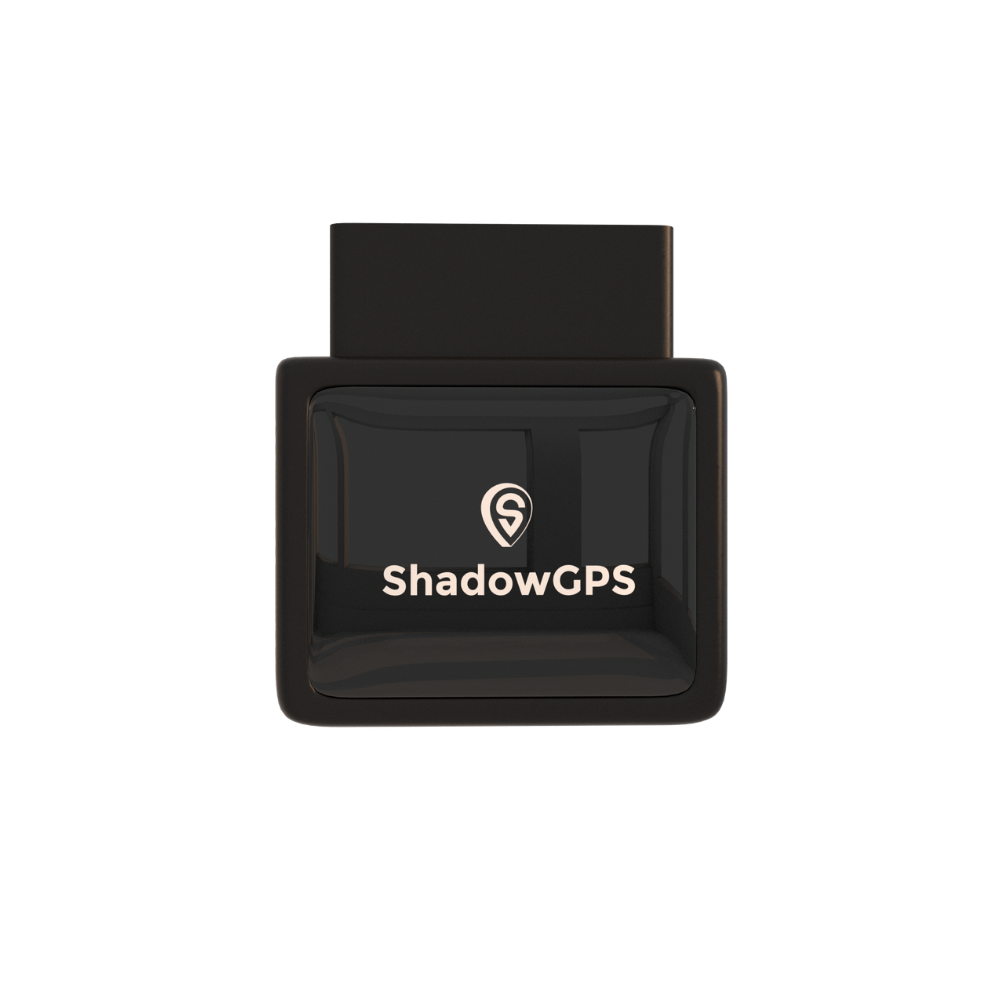
ShadowAuto
- Plugs into the OBD-II port in under 2 minutes, no tools
- Powered by your car, nothing to recharge
- Safe zones, Car Alarm, and trip replay in one app


If your car doesn't have an OBD-II port, or you'd rather the tracker stay out of sight, ShadowTrack is the other route.
ShadowTrack: Hide It Anywhere
ShadowTrack runs on a rechargeable battery, so it doesn't need a port at all. Tuck it in the trunk, the glovebox, or under a seat, or take it off your car and put it on a trailer, a boat, or a piece of equipment that sits in a yard for weeks. It's also the right choice for a classic car or RV in seasonal storage, where you don't want anything drawing on the battery.
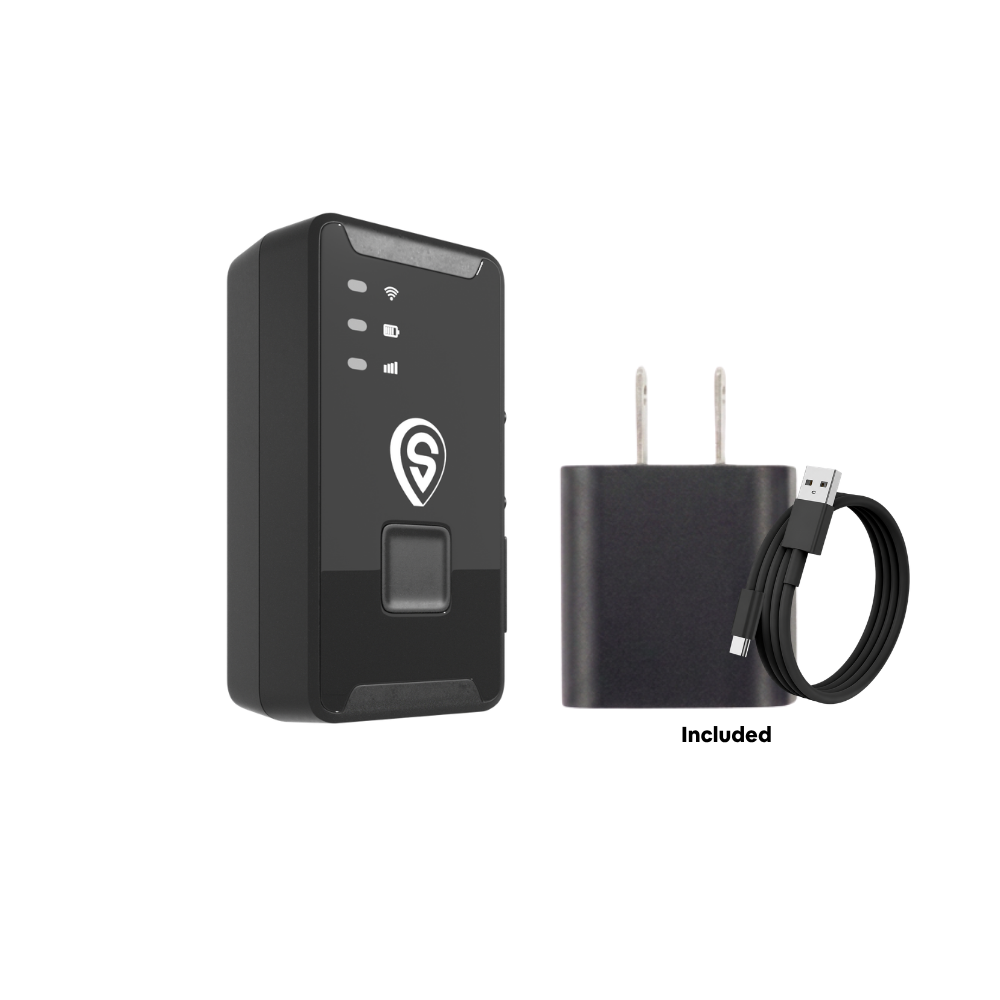
ShadowTrack
- Up to about 15 days per charge
- No port or wiring needed, place it in under 2 minutes
- Moves between cars, trailers, and equipment
Best for: ShadowAuto if you want a tracker that lives in one car or truck and never needs charging. ShadowTrack if you need to hide it, move it between assets, or protect something that doesn't have an OBD-II port.
How to Set Up a Safe Park Zone in 6 Steps
Here's the full process from box to first alert:
- Plug in your tracker (or place it, for ShadowTrack).
- Download the app and add your tracker to your account.
- Drop a pin where your car actually parks and name the zone.
- Size the zone so normal GPS drift stays inside it.
- Choose your alerts: exit, entry, or both.
- Test it by driving out and back in.
Step 1: Plug In Your Tracker
For ShadowAuto, find the OBD-II port. On most cars it sits under the dashboard on the driver's side, near the steering column, and every car and light truck sold in the US since 1996 has one. Push the tracker in until it's snug, then park outside for a few minutes so it can get its first GPS fix.
For ShadowTrack, charge it fully first. Then place it somewhere with a view of the sky through glass or plastic, not buried under thick metal, which can weaken the signal.
Step 2: Download the App and Add Your Tracker
Get the free ShadowGPS app on the App Store or Google Play, or use the web dashboard on a computer. Create your account, add your tracker, and pick a plan. Once your car shows up on the live map, you're ready to draw. See everything the app does on the ShadowGPS app page.
Step 3: Drop a Pin Where Your Car Actually Parks
Center the zone on your parking spot, not your street address. Map addresses often sit on the middle of the roofline or the street, which can put the edge of your zone uncomfortably close to your car.
Then give it a name you'll recognize at a glance from a lock-screen notification. "Home Driveway" and "Office Lot B" beat "Zone 1" every time, especially once you have three or four zones.
Circle or Custom Shape?
A circle around a single point is the fastest and works for most driveways and lots. A custom outline, where your app offers one, fits long or oddly shaped spaces better, like a strip of street parking or a narrow job yard along a fence.
Step 4: Size Your Zone Right
This is the step most people get wrong, and it's the main cause of false alerts. Too small and GPS drift makes your parked car look like it "left." Too big and your car is well down the road before you hear about it. Use the sizing table in the next section as your starting point.
Step 5: Choose Your Alerts
Turn on exit alerts for every safe park zone. Add entry alerts only where an arrival actually matters to you, such as school, a teen's workplace, or a Turo return spot. If every zone pings you on every arrival, you'll start ignoring them, and alerts you ignore protect nothing.
For overnight peace of mind, pair your home zone with the app's Car Alarm feature when you park for the night, so you have a second layer watching your car while you sleep.
Step 6: Test It Before You Rely On It
Drive out of the zone and note how quickly the alert lands on your phone, then drive back in. While you're at it, check two phone settings that quietly block alerts: notification permission for the ShadowGPS app, and any Focus, Do Not Disturb, or battery-saver mode that silences apps overnight. Re-test after big phone updates.
How Big Should a Geofence Be?
For a home driveway, start with a radius of about 150 to 250 feet. That's large enough to absorb normal GPS drift and small enough that you'll know your car moved before it's out of the neighborhood. Go bigger near tall buildings and in parking garages, where the signal is weaker.
The reason is simple physics. According to GPS.gov, a typical GPS receiver in a phone is accurate to within about 16 feet under open sky, but accuracy gets worse near buildings, bridges, and trees. Your zone needs a margin bigger than that wobble.
| Where you park | Starting radius | Why |
|---|---|---|
| House driveway or garage | 150 to 250 ft | Open sky, small space, covers street parking out front |
| Apartment or condo lot | 250 to 400 ft | Assigned spots vary and nearby buildings bounce the signal |
| Office or school lot | Lot edge plus about 100 ft | Catches the whole lot so changing spots doesn't trigger alerts |
| Airport or parking garage | 400 to 600 ft | Concrete blocks GPS; the alert lands as your car reaches open air |
| Job yard or storage lot | Fence line plus about 100 ft | Matches the property you actually control |
These are starting points, not rules. If you get an alert while your car is clearly still parked, widen the zone by 50 to 100 feet and test again.
7 Safe Park Zone Setups Worth Copying
These are the setups that tend to get real use, grouped by who you are.
1. The Overnight Home Zone (Every Car Owner)
One zone around your driveway with exit alerts on. If your car moves at 2 a.m., you know right away instead of at 7 a.m. when you walk out with your coffee. For a deeper dive on overnight settings, read how to set up geofence alerts that catch overnight theft.
2. School and Work Arrivals (Parents of Teen Drivers)
Entry alerts at school and at your teen's job, plus an entry alert at home for the drive back. You get "made it" without the check-in texts, and your teen gets a little more room to grow into the role. Have the conversation first, so the tracker feels like a safety net and not a secret. The NHTSA teen driving guide is a good starting point for setting ground rules together, and our guide to GPS tracking for teen drivers and elderly parents covers the family side.
3. The Turo Host's Storage and Handoff Zones
A zone around where your cars wait between trips, with exit alerts, and an entry alert at the agreed return spot. You'll know when a trip actually starts and ends, not just when the app says it does. Mention the tracker in your listing; it's the honest move and it heads off disputes. More on that in our GPS tracking for Turo hosts page.
Example setup: a 3-car Turo host
Picture a host with three cars and one storage lot. One ShadowAuto per car, one shared zone around the lot (fence line plus about 100 feet, exit alerts on), and one "Return Spot" zone at the airport cell-phone lot with entry alerts on. Five minutes of setup per car, and a quick look at trip replay settles any "I returned it on time" question.
4. Airport and Long-Term Parking
Before you fly out, add a temporary zone around the garage with a generous radius. If your car leaves while you're three time zones away, you'll know, and live tracking shows you where it went. Delete the zone when you're back so it doesn't clutter your list. Our parking lot tracker tips cover a few more tricks for big lots.
5. After-Hours Yard for a Small Fleet (2 to 5+ Trucks)
One zone around the yard, exit alerts on every truck. During the workday you won't need it; after hours and on weekends, any truck leaving the yard is worth knowing about right away. If you're sizing up tracking for a handful of trucks, see choosing fleet GPS tracking for 3 to 10 vehicles.
6. Trailers, Boats, and Equipment
Put a ShadowTrack on the trailer or machine and draw a zone around wherever it lives. Equipment tends to sit still for weeks, which is exactly when nobody is looking at it.
7. Seasonal Storage for a Classic Car or RV
A battery-powered tracker and a tight zone around the storage space or barn. Set it in the fall and you'll know if anything moves before you visit again in spring. Just top up the charge on your regular check-ins.
Common Geofencing Mistakes (and Easy Fixes)
- Zone is too small. GPS drift makes a parked car look like it left. Fix: widen by 50 to 100 feet and re-test.
- Zone is centered on the address, not the parking spot. Fix: drag the pin to where your car actually sits.
- Phone is silencing the app. Fix: allow notifications and exempt the app from overnight Focus or battery-saver modes.
- Entry alerts everywhere. Too many pings and you'll tune them out. Fix: exit alerts by default, entry alerts only where arrival matters.
- Tracker buried under metal. A weak signal means late or missing updates. Fix: give ShadowTrack a clear path to the sky through glass or plastic.
- Zones that never get updated. You moved, changed jobs, or your teen switched schools. Fix: review your zone list every few months.
Safe Park Zones vs. Other Ways to Protect a Parked Car
A safe park zone isn't the only tool out there, and it works best alongside the basics. Here's how the common options compare on the one thing that matters when you're not standing next to your car: whether you'll find out it moved.
| Option | Alerts you when your car leaves? | Live map location? | Contract | Best for |
|---|---|---|---|---|
| Steering wheel lock | No | No | None | A visible deterrent |
| Factory car alarm | Only within earshot | No | None | Scaring off a break-in |
| Apple AirTag | No zone exit alerts | Only near other Apple devices | None | Finding keys and bags |
| Carmaker connected app | Varies by make and year | Often | Often a paid plan after a trial | Newer cars that support it |
| Bouncie | Yes (Geo-Zones) | Yes, every 15 sec | None | OBD tracking for one car |
| ShadowAuto | Yes, safe zones + Car Alarm | Yes, live while moving | None, ever | Cars, trucks, Turo, small fleets |
| ShadowTrack | Yes, safe zones | Yes, live while moving | None, ever | Hidden or portable: trailers, equipment, storage |
Competitor features as publicly listed in October 2026. Carmaker app features vary widely by brand, model year, and trim.
The takeaway: locks and alarms help in the moment, and they're worth keeping. A safe park zone covers the hours when nobody's around to hear an alarm. With US vehicle thefts at 659,880 in 2025, or one every 48 seconds, according to the National Insurance Crime Bureau, layering both is simply sensible. For more on what the data shows, see GPS trackers vs. car theft: real stats.
Is it legal to geofence a car?
Tracking a car or truck you own is legal throughout the US, and that includes a car your teen drives if it's yours. Tracking a car you don't own, or another adult's car without their consent, can break state stalking and privacy laws. If you track company trucks, tell your drivers in writing. Laws vary by state, so this isn't legal advice; our guide on GPS tracking laws for employee vehicles goes deeper.
What Does a Safe Park Zone Cost?
Safe zones aren't an add-on. They come with every ShadowGPS plan, alongside live tracking, trip replay, and Car Alarm. The tracker is $69.90, and plans run $12 to $15 a month, or $10 to $13 a month once you have 4 or more trackers. No contract, ever. Go month-to-month, or prepay and save, and cancel any time.
Every order is also covered by a 30-day money-back guarantee, so you can set up your zones, live with the alerts for a few weeks, and decide for yourself. Full details are on the pricing page.
Safe park zone checklist
- Plug in ShadowAuto, or place a charged ShadowTrack with a clear view of the sky
- Center each zone on the parking spot and give it a clear name
- Start at 150 to 250 ft for a driveway, larger for lots and garages
- Exit alerts where your car should stay, entry alerts where it should arrive
- Test once, and make sure your phone isn't silencing the app
Frequently Asked Questions
Is there a monthly fee for geofencing?
Geofencing is included in every ShadowGPS plan, so there's no separate charge for it. Plans run $12 to $15 a month ($10 to $13 with 4+ trackers). No contract. Month-to-month, or prepay and save.
How do I set up a geofence for my car?
Plug a GPS tracker into your car, open its app, drop a pin on the spot where you park, set the size of the zone, and turn on exit or entry alerts. Then drive out of the zone once to confirm the alert reaches your phone.
Does a GPS tracker need a SIM card for geofencing?
A real-time tracker needs a cellular connection to send its location to your phone, which is what the monthly plan covers. You don't need to buy or insert a SIM card of your own for a ShadowGPS tracker.
Does geofencing use GPS?
Yes. Vehicle geofencing uses GPS to find where your car is and a cellular connection to send that location to the app, which checks it against your zone. Phone-based geofences can also use Wi-Fi and cell towers.
What's the difference between geofencing and GPS tracking?
GPS tracking shows where your car is when you look. Geofencing watches a boundary for you and sends an alert automatically when your car crosses it.
How accurate is a geofence?
Under open sky, GPS is typically accurate to within about 16 feet, but accuracy drops near tall buildings, under trees, and inside garages. That's why a home zone should start around 150 to 250 feet, with bigger zones in dense areas.
Can I set up more than one safe park zone?
Yes. Most people use two or three, such as home, work, and a storage spot, and owners with several cars or trucks often share one zone around a yard or lot.
Does geofencing work in a parking garage?
Concrete blocks GPS signals, so location inside a deep garage is less precise. Draw a larger zone around the whole structure and the alert will land as your car reaches open air at the exit.
Can a geofence help me get my car back if it's stolen?
A geofence tells you quickly that your car moved, and live tracking shows where it is going. Share that location with police rather than going after the car yourself.
Is it legal to put a geofence on my teen's car?
If you own the car, tracking it is legal in the US. Tracking a car you don't own, or another adult's car without consent, can break state laws. Talking it through with your teen first makes it work far better in practice.
Plug It In, Draw the Line, Get Back to Your Day
A safe park zone takes a few minutes to set up and then mostly stays out of your way. Your car sits in the driveway, nothing happens, and you never think about it. The one night something does happen, you know right away, with a live map in your hand.
Start with one zone at home, size it right, test it once, and add more only where they earn their place.
Know where your car is. Every time you check.
Plug it in, see it move, cancel any time. No contract, ever.
Pricing and plans current as of October 2026. Theft figures from the National Insurance Crime Bureau's 2025 Vehicle Theft Report. GPS accuracy figures from GPS.gov. Some links on this page are Amazon affiliate links, and we may earn a commission at no extra cost to you. Nothing here is legal advice; check your state's laws before tracking any car you don't own.

