

What GPS tracking features does a small business actually need in 2026? For most owners running 1 to 10 vehicles, it comes down to five things: a live map that refreshes fast, trip history you can replay, geofence and tamper alerts, one app that shows every truck at once, and a monthly fee with no contract attached.
Everything else, from dash cams to electronic logs, depends on what you drive and how you are regulated. This guide ranks 12 GPS fleet tracking features into must-haves, nice-to-haves, and "only if you need it," with a plain-English check you can run on any tracker before you buy.
We build GPS trackers, so we will also be straight about where ShadowGPS fits and where a different kind of system is the better call.
The must-have GPS fleet tracking features in 2026 are: real-time location that refreshes every 15 seconds or faster, trip history with replay, geofence and tamper alerts, one app and web dashboard for every vehicle, LTE coverage, and month-to-month pricing. Add engine diagnostics if your trucks are getting older, and an FMCSA-registered ELD only if your drivers are required to log hours of service.
First, figure out what kind of business you are
Most feature lists online are written by enterprise fleet vendors. That is why they lead with ELDs, AI dash cams, and dispatch software that a three-truck landscaping crew will never open.
Before you compare a single feature, place yourself in one of these three groups:
Owner-operator, 1 to 2 vehicles
You want to know where your truck is, get a ping if it moves after hours, and see where it went yesterday. A plug-in tracker covers almost everything.
Small service fleet, 3 to 10 vehicles
You need every truck on one map, job-site arrival times, and trip records you can pull when a customer questions an invoice. Add battery trackers for trailers and equipment.
Regulated or large fleet
Trucks over 10,001 lbs crossing state lines, drivers logging hours of service, or 50+ vehicles. You need a registered ELD and a full fleet platform, which is a different product category.
This guide is written for the first two groups. If you are in the third, Tier 3 below tells you what to look for.
The 12 GPS fleet tracking features, ranked
We sorted these by how often they solve a real, daily problem for a small business, not by how impressive they look in a sales demo.
Tier 1: Must-have features
1. Real-time tracking with a fast refresh rate
"Real-time" is printed on every tracker box, but it means very different things. The number that matters is the refresh rate, also called the update interval: how often the tracker sends a new location while your truck is moving.
Here is the refresh-rate math. At 45 mph, a truck covers about 66 feet every second, so the gap between map updates looks like this:
| Refresh rate | Distance between map updates at 45 mph | What it feels like on the map |
|---|---|---|
| Every 3 minutes | About 2.25 miles | Fine for a parked trailer, frustrating for a moving truck |
| Every 60 seconds | About 0.75 miles | The dot jumps between streets |
| Every 15 seconds | About 990 feet | Smooth enough for most dispatch decisions |
| Every 5 seconds | About 330 feet | The dot moves with the truck, block by block |
ShadowGPS trackers update every 5 seconds while moving, on every plan. For comparison, Bouncie updates every 15 seconds, and many budget trackers default to 1 to 3 minutes unless you pay for a faster tier.
Accuracy is a separate question from speed. Under open sky, GPS-enabled phones are typically accurate to within about 16 feet, according to GPS.gov. Dedicated trackers land in a similar range, with more drift in parking garages and dense downtown blocks.
What to check: Ask for the refresh rate while moving and while parked, and whether faster updates cost extra.
2. Trip history and trip replay
Live location tells you where a truck is right now. Trip history tells you what happened. A good tracker logs every start, stop, and route, then lets you replay the day on a map.
For a small business, this is the feature that settles arguments. A customer says your tech never showed up. A driver says the detour was traffic. An insurance adjuster asks where the truck was at 2:14 p.m. Trip timeline and trip replay are consistently the features ShadowGPS customers use most.
What to check: How far back history goes (ShadowGPS keeps up to a year), and whether you can pull a specific day in a few taps.
3. Geofence alerts
A geofence is a virtual boundary you draw on the map around your yard, a job site, or a customer's address. When a truck enters or leaves it, you get a notification on your phone.
Two geofences almost every small business should set on day one: your yard after hours, which catches unauthorized use and theft early, and your biggest recurring job site, which confirms arrival times without a phone call. Here is a step-by-step guide to setting geofence alerts that catch overnight theft.
What to check: Is there a cap on how many geofences you can create, and can you name them so alerts make sense at a glance?
4. Tamper, movement, and theft alerts
For a business, a stolen work truck is lost revenue on top of a lost vehicle. The features that matter here are an alert if the tracker is unplugged or tampered with, a motion alert if your truck moves when it should be parked, and a fast live map so you can hand police a current location instead of a last-known one.
ShadowGPS also includes a Car Alarm feature built for exactly this moment, and many owners hide a battery tracker as a backup in case the plug-in tracker is found. Our guide to recovery steps for a stolen vehicle walks through what to do in the first hour.
What to check: Does the tracker alert you the moment it loses power or is removed?
5. One app and web dashboard for every vehicle
If you run more than one truck, you need to see them all on one map: from your phone in the field and from a laptop at the office. Logging into separate accounts per vehicle gets old by day two.
Look for live location sharing too. A Share Location link you can text to a customer or partner lets them watch a truck arrive without getting access to your account.
What to check: Can you name and manage every tracker from one dashboard, and is there a web version, not just a phone app?
6. Simple setup: plug in, magnet, or hardwire
How a tracker gets into your truck decides how fast you are up and running, and how easy it is to move when you sell or swap a vehicle.
- Plug-in OBD-II trackers: These go into the diagnostics port under the dash, which every car and light truck sold in the U.S. since the 1996 model year has. Plug it in, under 2 minutes, no tools, powered by your truck. Not sure where yours is? See where is my OBD2 port.
- Battery trackers: Magnet-mount or hide them on trailers, mowers, generators, or anything without an OBD-II port. You recharge every week or two depending on how much the asset moves.
- Hardwired trackers: Wired into the electrical system by a technician. Harder to find, but slower and more expensive to set up and to move between trucks.
For a deeper breakdown, read our battery-powered vs. OBD tracker comparison.
What to check: Do you need a professional to set it up, and can you move it yourself later?
7. Reliable LTE coverage
A tracker is only as good as the cellular network it reports over. The 3G networks many older trackers relied on were shut down in 2022, as the FCC warned, so any device still sold on 2G or 3G is a dead end.
Modern trackers use LTE-M, a low-power slice of 4G built for small connected devices. ShadowGPS trackers run on LTE-M, and the network has held 99.9% uptime with roaming coverage in 188 countries.
What to check: Which network does it use, and what happens when a truck drives through a dead zone?
8. Transparent pricing with no contract
"Is there a monthly fee?" is the most-asked question about GPS tracking, and the answer is often buried in fine print. Many fleet platforms quote per-vehicle pricing on multi-year agreements, and some budget trackers only hit their advertised rate if you prepay two years up front.
ShadowGPS is $15 a month per tracker month-to-month, or $13 each once you run 4 to 10 trackers. Prepay quarterly, yearly, or for two years and it drops to as low as $9 ($8 for 4 to 10 trackers). No contract, ever. Month-to-month, or prepay and save, and cancel any time. Full details are on our pricing page, and our breakdown of what GPS tracking really costs a small fleet covers the rest of the market.
What to check: Is there an activation fee, a cancellation fee, or a minimum term?
Tier 2: Strong-to-have features
9. Engine diagnostics and check engine codes
A plug-in tracker sits on the same port your mechanic's scanner uses, so it can read diagnostic trouble codes (DTCs) when the check engine light comes on. Knowing whether a code means a loose gas cap or a misfire before you send a truck 60 miles out matters when that truck is your income.
ShadowAuto reads engine codes right in the app. Pair those alerts with a simple mileage-based service schedule and you will catch most problems before they turn into a tow. Learn more in how to read engine diagnostics remotely.
What to check: Does the app show the code with a plain-English meaning, or just a number?
10. Driving and idle reports
Speeding, harsh braking, and idle-time reports help you coach drivers and cut waste. Idling alone burns more than 6 billion gallons of fuel a year in the U.S., according to the Department of Energy's Alternative Fuels Data Center, and a light-duty truck burns roughly 0.2 to 0.5 gallons for every hour it sits running, per EPA estimates.
For a three-truck crew, simple reports you actually read beat a complex scorecard nobody opens.
What to check: Which events get flagged, and can you tune alerts so you are not buried in notifications?
11. Data access: history, exports, and an API
Your trip data becomes most useful outside the tracker app: mileage logs at tax time, proof of service for invoices, and the records your insurance company may ask for each year.
For businesses that want to pull location data into their own tools, ShadowGPS offers a public REST API.
What to check: Can you get your trip records out easily, and does API access cost extra?
Tier 3: Only if your business needs it
12. ELD compliance, dash cams, and dispatch software
These are the features enterprise vendors lead with. They are essential for some fleets, and they are also why many small businesses end up paying for software they never use.
- ELDs and hours of service: FMCSA requires a registered ELD for most drivers who must keep records of duty status, which generally covers commercial vehicles of 10,001 lbs or more operating across state lines. Short-haul drivers who stay within 150 air miles are among the exceptions. A GPS tracker is not an ELD. If you are unsure, start at FMCSA's ELD page.
- Dash cams and video: Useful for liability and insurance claims if your drivers put in serious highway miles. A standalone dash cam can sit alongside any GPS tracker.
- Route optimization and dispatch: Valuable when each truck makes 15 to 20+ stops a day. Below that, a live map and a shared location link usually do the job.
- Fuel card and payroll integrations: Worth paying for once you are reconciling dozens of fuel receipts a week.
Honest note: ShadowGPS is not an ELD and does not sell dash cams. If your fleet needs those, choose a dedicated ELD provider. A ShadowTrack can still earn its place hidden on trailers or equipment that the ELD system does not cover.
Features that sound great in a demo but rarely pay off for small fleets
2026 feature lists are full of AI. Some of it is useful. A lot of it was built for a 500-truck safety department. Be skeptical of:
- Predictive "AI risk scores" for three drivers: You already know who drives fast. Plain speeding alerts do the same job.
- Gamified driver leaderboards: Motivating with 200 drivers, awkward with two employees and your brother-in-law.
- Driver-facing cameras: Common in long-haul trucking, but a trust problem on a small crew. Talk to your team first. Here is how to tell your crew about GPS trackers without losing their trust.
- "Free" hardware on a multi-year term: The device is not free if you cannot leave.
GPS fleet tracking features compared by tracker type
Here is how the main kinds of trackers stack up against the features that matter most to a small business.
| Tracker type | Refresh while moving | Setup | Contract | Trip replay + alerts | Engine codes | ELD / video | Best for |
|---|---|---|---|---|---|---|---|
| Bluetooth tag (e.g. AirTag) | Only when a nearby phone passes | Drop it in | None | No trip history | No | No | Keys and bags, not trucks |
| Budget battery tracker, base plan | 1 to 3 min | Magnet | Best rate often needs 2-yr prepay | Basic | No | No | Parked assets |
| Enterprise fleet platform | Varies by plan | Often hardwired or pro setup | Often multi-year | Yes | Yes | Yes | Regulated fleets, 20+ vehicles |
| ShadowTrack (battery) | 5 sec | Magnet or hide, under 2 min | None, ever | Yes | No | No | Trailers, equipment, non-OBD assets |
| ShadowAuto (OBD-II) | 5 sec | Plug in, under 2 min | None, ever | Yes | Yes | No | Cars, trucks, vans, Turo |
Competitor details reflect typical public plan listings as of October 2026. Enterprise terms vary by vendor and quote, so confirm current terms before you buy.
How to choose a GPS tracker for company vehicles in 5 steps
- List every vehicle and asset. Mark which have an OBD-II port (cars, pickups, vans) and which don't (trailers, mowers, generators).
- Write down your top three problems. Theft? Proof of service? After-hours use? Match features to problems, not to the brochure.
- Confirm whether you need an ELD. If your drivers don't keep hours-of-service logs, don't pay for one.
- Test the map yourself. Plug one tracker in, drive around the block, and watch it move. ShadowGPS includes a 30-day money-back guarantee for exactly this.
- Read the cancellation terms before you buy. If you can't find them in a minute, that tells you something.
Running 3 to 10 trucks? Our guide to choosing fleet GPS tracking for 3 to 10 vehicles goes deeper on that exact size.
Example setups for real small businesses
These are typical setups, not customer stories, to show how the features above map to everyday work.
Landscaping crew: 3 trucks, 2 trailers
A ShadowAuto in each truck and a ShadowTrack on each trailer. One geofence around the yard after 7 p.m. Five trackers, one map, and the lower 4-to-10 tracker rate. More on GPS trackers for landscaping.
Turo host: 4 cars
A ShadowAuto in each car for live location and trip history between bookings, plus a tamper alert if a guest unplugs it. See our Turo host setup.
Contractor: 1 work truck plus equipment
A ShadowAuto in the truck for engine codes and theft alerts, and a ShadowTrack hidden on the generator or in the job box.
Where ShadowGPS fits
ShadowGPS is built for owners who are responsible for a handful of vehicles that matter, not for a 500-truck safety department. The pitch is simple: fast updates, plug it in yourself, and always know where your truck is. Customers rate our trackers 4.3 to 4.6 out of 5 across 199 verified on-site reviews.
ShadowAuto: the plug-in tracker for your work vehicles
ShadowAuto plugs into the OBD-II port in under 2 minutes and runs on your truck's power, so there is nothing to charge. It covers every Tier 1 feature and adds engine code reading, which makes it the default pick for work trucks, service vans, and rental cars.
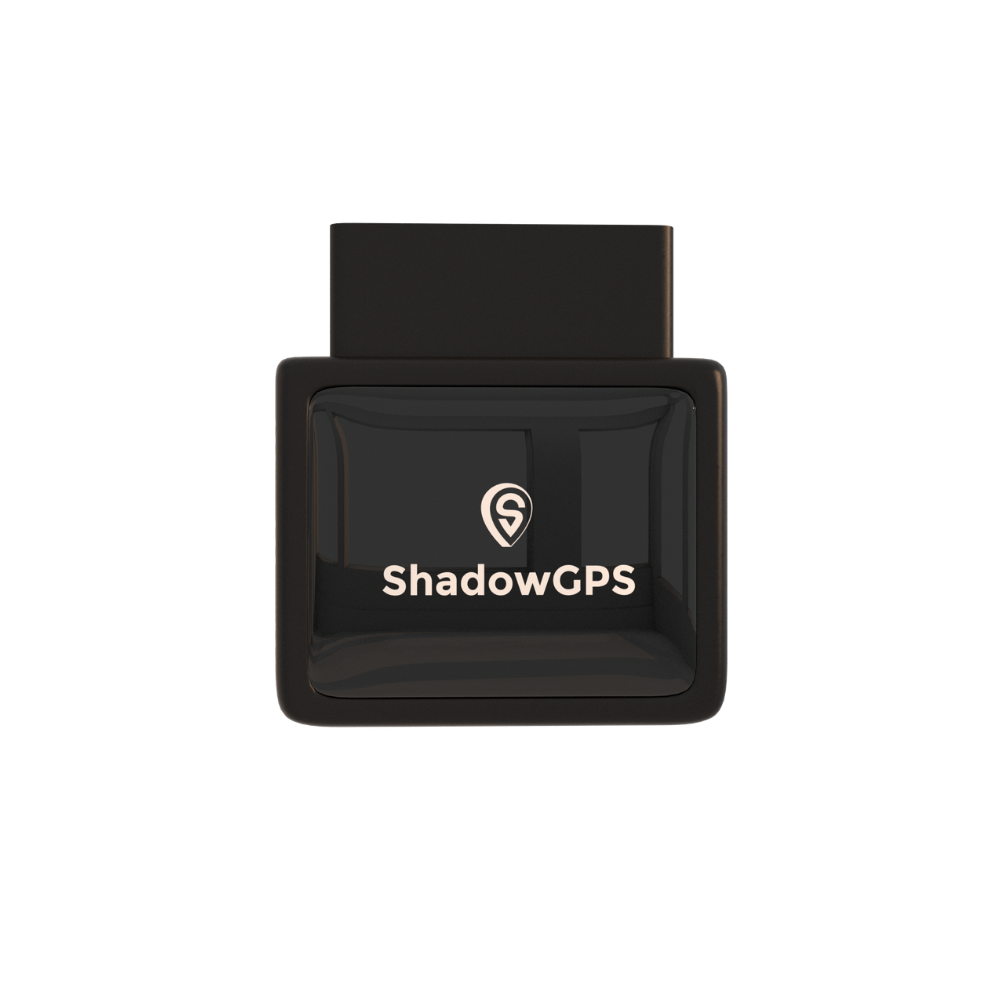
ShadowAuto
- Powered by your truck, nothing to charge
- Engine codes and Car Alarm in the app
- Live map, trip timeline and trip replay


ShadowTrack: for trailers, equipment, and anything without a port
ShadowTrack is battery powered, runs up to about 15 days per charge, and mounts by magnet or hides almost anywhere. Use it on trailers, mowers, and generators, or as a hidden backup in a truck that already has a ShadowAuto. Both trackers show up side by side in the same ShadowGPS app and web dashboard.
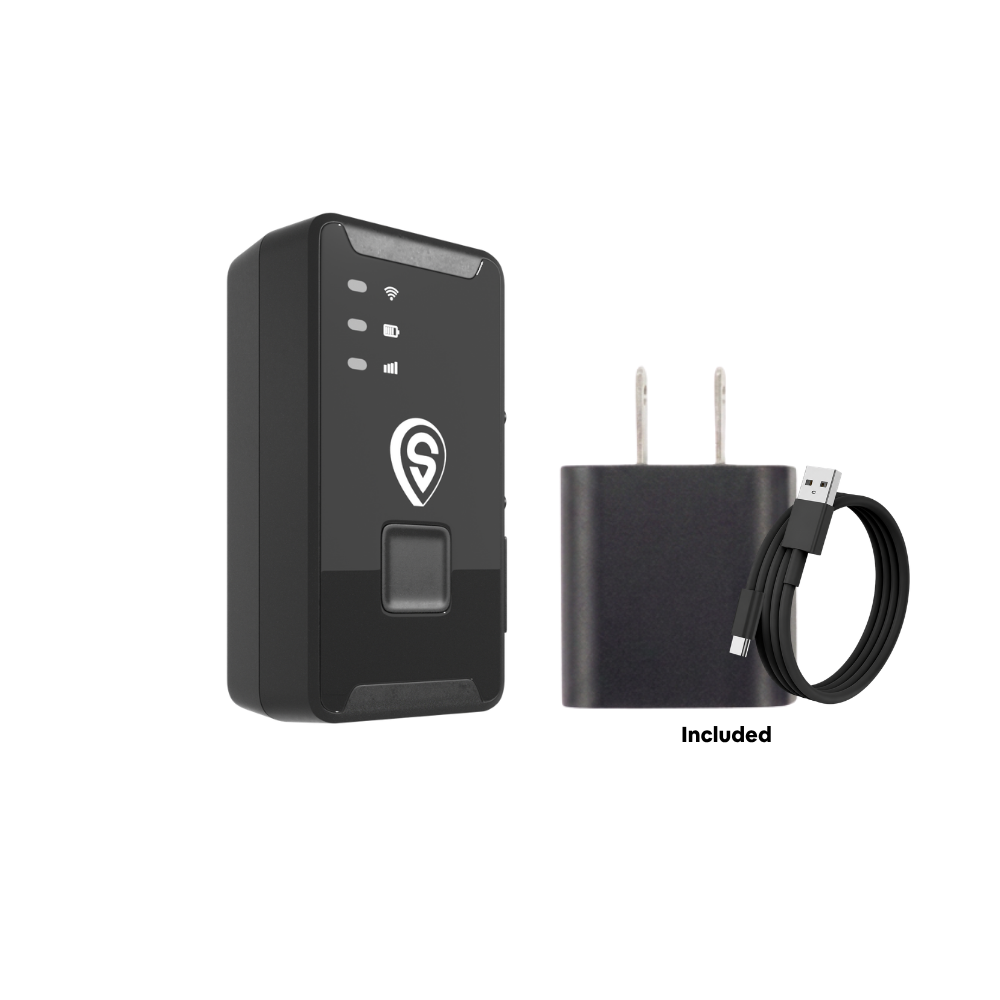
ShadowTrack
- Up to about 15 days per charge
- Works on assets with no OBD-II port
- Motion and geofence alerts
Best for: owner-operators and small businesses running 1 to 10 vehicles plus trailers or equipment, who want fast live tracking without a contract or a sales call.
Can you legally track company vehicles and employees?
In general, U.S. businesses can GPS track vehicles they own. Risk starts when tracking reaches an employee's personal car or their off-hours time. A few states add notice rules: New York (Civil Rights Law Section 52-c) and Connecticut (General Statutes Section 31-48d) require employers to notify employees about electronic monitoring, and California Penal Code Section 637.7 bars using a tracking device to follow a person without consent, with an exception for the car's registered owner, lessor, or lessee.
The safe habit: tell your crew in writing, track company vehicles only, and leave personal trips alone. This is general information, not legal advice. Our full guide on GPS tracking laws for employee vehicles covers more states.
Frequently asked questions
Is there a monthly fee for GPS fleet tracking?
Yes. Almost every real-time GPS tracker has a monthly fee, because it sends your truck's location over a cellular network. ShadowGPS is $15 a month per tracker month-to-month, $13 each for 4 to 10 trackers, and less if you prepay a longer term. No contract, ever: month-to-month, or prepay and save, and cancel any time. You can also choose a prepaid bundle that covers 3 months, 1 year, or 3 years of service up front.
Does a GPS fleet tracker need a SIM card?
Cellular trackers connect through a built-in SIM, but with ShadowGPS you don't buy, insert, or swap one. The data connection is included in your plan, and the tracker works without Wi-Fi or a phone nearby. Read more in does your GPS tracker need a SIM card.
What refresh rate do I need for fleet tracking?
For moving vehicles, aim for 15 seconds or faster. Anything slower than a minute means the truck can travel three-quarters of a mile between updates at highway speed. Slower intervals of 1 to 3 minutes are fine for trailers and equipment that mostly sit parked.
Is a GPS tracker the same as an ELD?
No. An ELD is an FMCSA-registered device that records a driver's hours of service, and it's required for most commercial drivers who must keep records of duty status. A GPS tracker shows where your truck is and where it has been. Pickups, vans, and cars under 10,001 lbs usually need only a GPS tracker.
Is it legal to GPS track my company vehicles?
Generally yes, if your business owns the car or truck. Some states, including New York and Connecticut, require written notice to employees about electronic monitoring. Tell your team up front, track company vehicles only, and check your state's rules.
Should a small business use an OBD-II tracker or a battery tracker?
Usually both. Use a plug-in OBD-II tracker like ShadowAuto in cars, pickups, and vans, since it never needs charging and reads engine codes. Use a battery tracker like ShadowTrack on trailers, equipment, or as a hidden backup.
Can a driver unplug an OBD-II tracker?
Physically, yes, which is why tamper alerts matter. A good tracker tells you the moment it's unplugged. For extra certainty, hide a battery-powered tracker somewhere else in the truck as a backup.
Can I manage multiple trackers in one app?
Yes. ShadowAuto and ShadowTrack trackers all appear in one ShadowGPS dashboard, on the phone app and on the web, so you can see every truck, trailer, and piece of equipment on a single map.
How long does it take to set up a fleet GPS tracker?
With a plug-in or magnet-mount tracker, under 2 minutes per vehicle and no tools. Hardwired systems usually need a technician and take longer, which adds up across several trucks.
Know where every truck is, starting today
Plug it in, see it move, cancel any time. ShadowAuto for your cars and trucks, ShadowTrack for trailers and equipment, one app for all of them.
Pricing and plan details as of October 2026. Some Amazon and Best Buy links are affiliate links, and we may earn a commission at no extra cost to you. State law summaries are general information, not legal advice.

